
Use case — Web Development & Computing
Software engineering and DevOps teaching environments
Software engineering and DevOps fundamentals need environments students can safely break — version control, services, staging-versus-production thinking and deployment exercises. Cloud Pulse gives every student an identical, lecturer-defined Linux environment in the browser.
- Identical Linux environments for every student, accessed in the browser
- Git workflows and team version-control exercises
- Pre-configured stacks including Docker, Git and DevOps toolchains
- Deployment and staging concepts practised hands-on
- Templates reused every semester — no lab rebuilds
A use case supported by Education Host — platforms, hosting and infrastructure built exclusively for education.
The challenge: engineering practice is hard to teach on student laptops
DevOps fundamentals are about environments — and personal devices are the least controlled environment there is.
Toolchains fight the hardware
Docker, build tools and services install differently on every operating system — some student machines simply cannot run them.
Workflow exercises need parity
Branching, merging and code-review exercises only work when everyone's environment behaves the same way.
Broken environments block learning
Students experimenting with services and configuration will break things — recovery has to be a fresh environment, not a lost week.
How Education Host supports software engineering and DevOps teaching
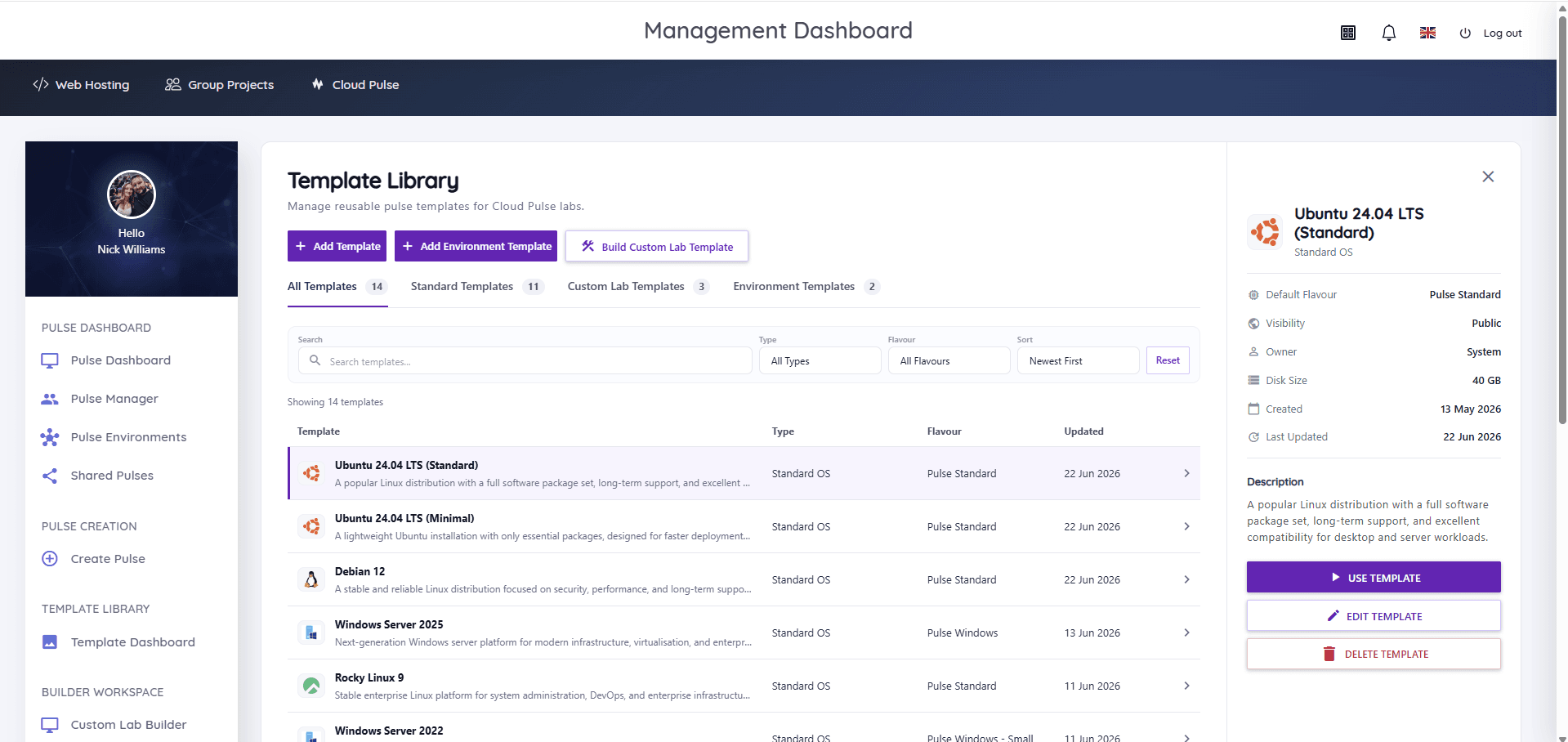
Cloud Pulse gives each student a lecturer-defined education virtual machine — a pulse — accessed through the browser with console and Web SSH access. Templates can carry the stacks engineering modules rely on, including Git, Docker and wider DevOps toolchains, so the whole cohort starts identical.
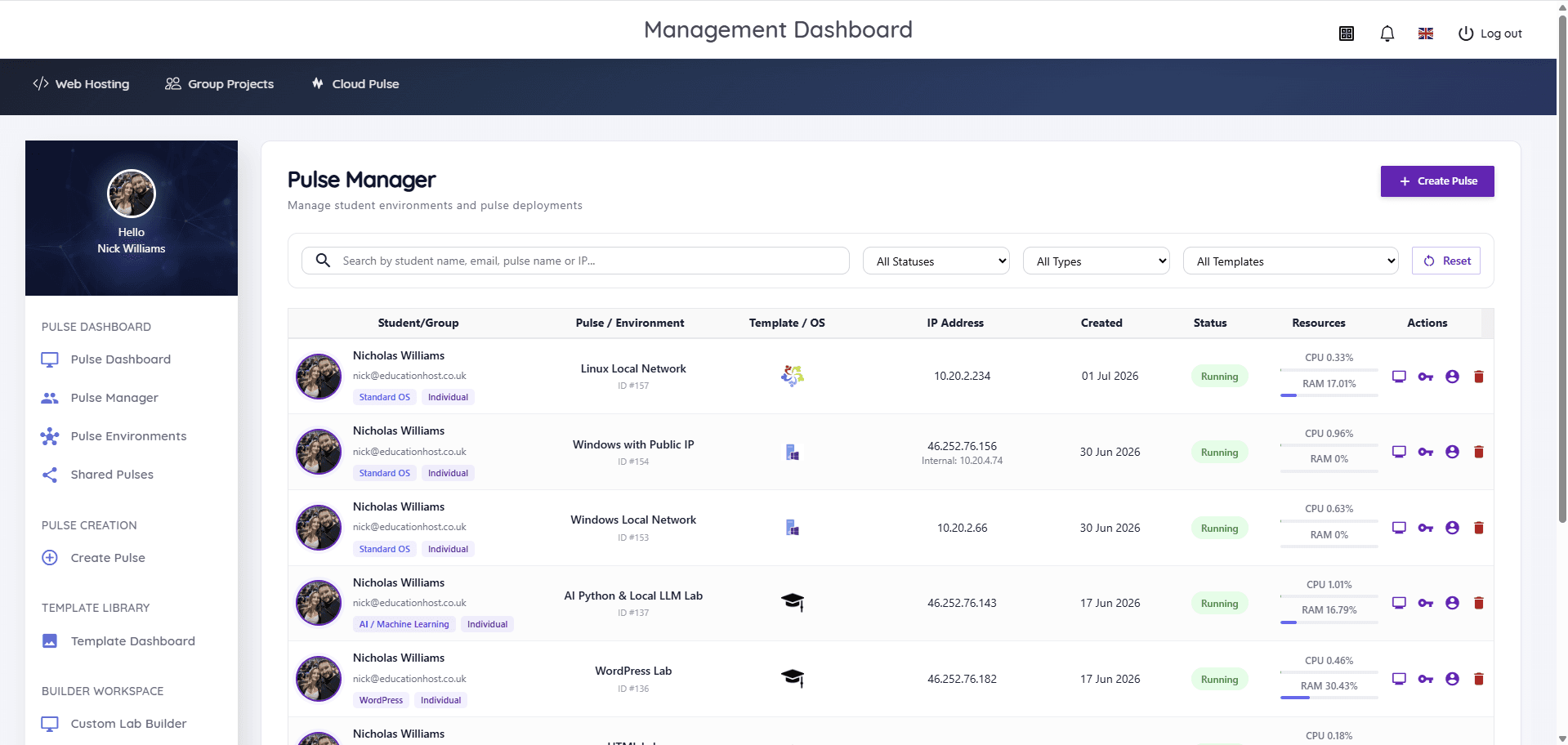
Because environments deploy from reusable templates, they can support teaching concepts such as staging versus production, repeatable builds and deployment pipelines — and a broken environment is replaced in minutes, not rebuilt by hand. Lecturers watch status live in Pulse Manager and can jump into a student's console to help.
- Lecturer-defined Linux environments from reusable templates
- Git, Docker and DevOps toolchains available as pre-configured stacks
- Browser console and Web SSH access — no local installs
- Individual pulses, shared pulses and group environments for team exercises
- Live status and resource usage for every environment in Pulse Manager
- Redeploy a clean environment when experiments go wrong
What students and lecturers can do
Hands-on engineering practice, safely sandboxed per student.
- Work through Git branching, merging and review workflows
- Run services, builds and containers inside their own pulse
- Practise staging, deployment and rollback exercises against real environments
- Break and rebuild environments without risking personal machines
- Collaborate in group environments for team-based engineering coursework
- Lecturers monitor every environment live and assist through the browser console
Example teaching activities
Exercises that fit Cloud Pulse engineering labs.
Team Git workflow
Feature branches, pull-request-style review and merge-conflict resolution across a shared repository.
Containerise an application
Students package an existing coursework app with Docker inside their pulse and run it as a service.
Staging-to-production exercise
Deploy an application to a 'staging' environment, verify it, then promote it — teaching pipeline thinking hands-on.
Break-and-recover lab
Deliberately misconfigure a service, diagnose it from logs, then redeploy a clean environment from the template.
Which Education Host platforms fit this use case
Software engineering and DevOps teaching is led by Cloud Pulse, with student hosting alongside for deployed artefacts.
Cloud Pulse
Browser-based computing labs for universities
The teaching lab layer — reusable Linux templates with Git, Docker and DevOps toolchains, monitored live by lecturers.
Explore Cloud PulseStudent Web Host Manager
Governed student web hosting at institutional scale
Where modules also deploy hosted web artefacts, governed student hosting sits alongside the labs.
Explore Student Web Host ManagerManaged Infrastructure
UK data-centre hosting, managed by Education Host
The managed UK infrastructure the labs run on — capacity and monitoring handled by Education Host.
Explore Managed InfrastructureTeaching outcomes
- Every student practises engineering workflows in an identical environment
- Deployment and pipeline concepts are experienced, not just described
- Broken environments cost minutes, not teaching weeks
- Lab templates carry the module from cohort to cohort unchanged
- Lecturers see and support student environments in real time
Explore related use cases
Scenarios institutions often pair with this one.
Full stack development
Front end, back end, databases and deployment in one teaching setup — hosted web projects plus browser-based labs for the heavier stacks.
Explore use caseAPI development & cloud
REST APIs, JSON, authentication and cloud-style deployment taught in managed environments students reach from any browser.
Explore use caseLinux server administration
Root access to real Linux servers for every student — users, permissions, services and SSH practised in browser-based labs.
Explore use caseGroup project hosting
Shared, governed spaces for team coursework — group sites and environments with clear membership, lecturer visibility and deadline controls.
Explore use caseSoftware engineering & DevOps — frequently asked questions
Direct answers about this use case and the Education Host platforms behind it.
- What are software engineering and DevOps teaching environments?
- They are managed, resettable development environments where students practise version control, services, builds and deployment workflows — provided consistently to a whole cohort instead of depending on personal laptops.
- How does Education Host support DevOps fundamentals teaching?
- Cloud Pulse provides lecturer-defined Linux environments from reusable templates, with stacks including Git, Docker and DevOps toolchains, browser-based access, live monitoring and clean redeployment when a student breaks their environment.
- Does Education Host provide CI/CD tooling?
- Cloud Pulse environments can support teaching concepts such as staging, deployment workflows and pipeline thinking, with lecturers defining the tools inside each template. Specific CI/CD toolchains are scoped with your module requirements during onboarding.
- Which Education Host platform is best for this?
- Cloud Pulse is the core platform for software engineering and DevOps teaching. Student Web Host Manager adds governed web hosting where modules also publish hosted artefacts.
- Can students break their environments safely?
- Yes. Each student works in their own isolated pulse, and a misconfigured environment can be replaced from the module template in minutes — which makes failure a safe, teachable moment.
- Can this support group engineering projects?
- Yes. Cloud Pulse supports shared pulses and group environments, so teams can run collaborative version-control and deployment exercises in one place.
- How do we start?
- Book a consultation with Education Host — we'll scope the toolchain your module needs, build it into a reusable Cloud Pulse template and confirm capacity for your cohort.
See how this use case fits your institution
Tell us about your modules, cohorts and calendar, and we'll map this use case to the right Education Host platforms — including what to leave out.