
Use case — AI, Data & Cloud
AI and Python teaching labs for education
AI and Python modules stall when the first fortnight goes on installation problems. Cloud Pulse gives every student a ready-made Python environment in the browser — notebooks, libraries and, where configured, local model experiments — from a template the lecturer controls.
- Ready-to-use Python environments, accessed in the browser
- Jupyter-style notebooks and module-specific libraries
- Local LLM lab environments, where configured
- Identical environments across the whole cohort
- Templates reused every semester without rebuilds
A use case supported by Education Host — platforms, hosting and infrastructure built exclusively for education.
The challenge: AI teaching loses weeks to environment setup
Python versions, package conflicts and hardware differences turn the start of every AI module into support triage.
Dependency chaos
Python environments, package versions and system libraries collide differently on every student machine.
Uneven hardware
Some laptops handle the coursework; others cannot — and marking against uneven environments is unfair by design.
Labs rot between years
A working AI lab hand-built one year rarely survives to the next — packages move, machines change, notes go stale.
How Education Host supports AI and Python teaching
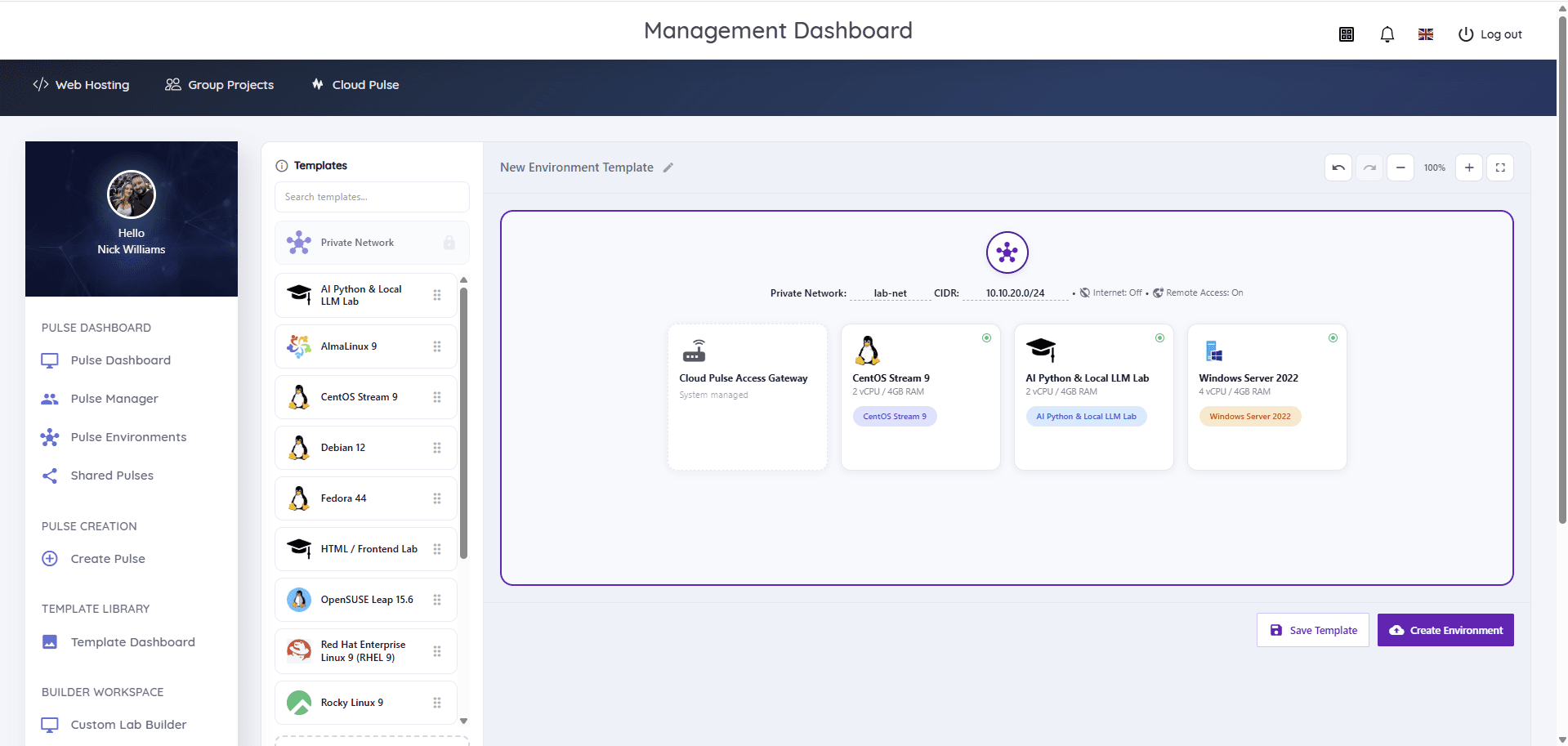
Cloud Pulse provides AI and Python lab environments as reusable templates: lecturer-defined education virtual machines preloaded with Python, notebook tooling and the module's libraries, accessed by students through a browser with console and Web SSH access.
Where configured, labs can include local LLM environments for hands-on model experiments inside a managed pulse rather than on student hardware. Lecturers watch every environment live in Pulse Manager, help through the browser console, and redeploy the same template for every future cohort.
- Lecturer-built images preloaded with the module's Python stack
- Jupyter-style notebook workflows inside managed environments
- Local LLM lab environments for model experiments, where configured
- Browser access from any device — no local installs
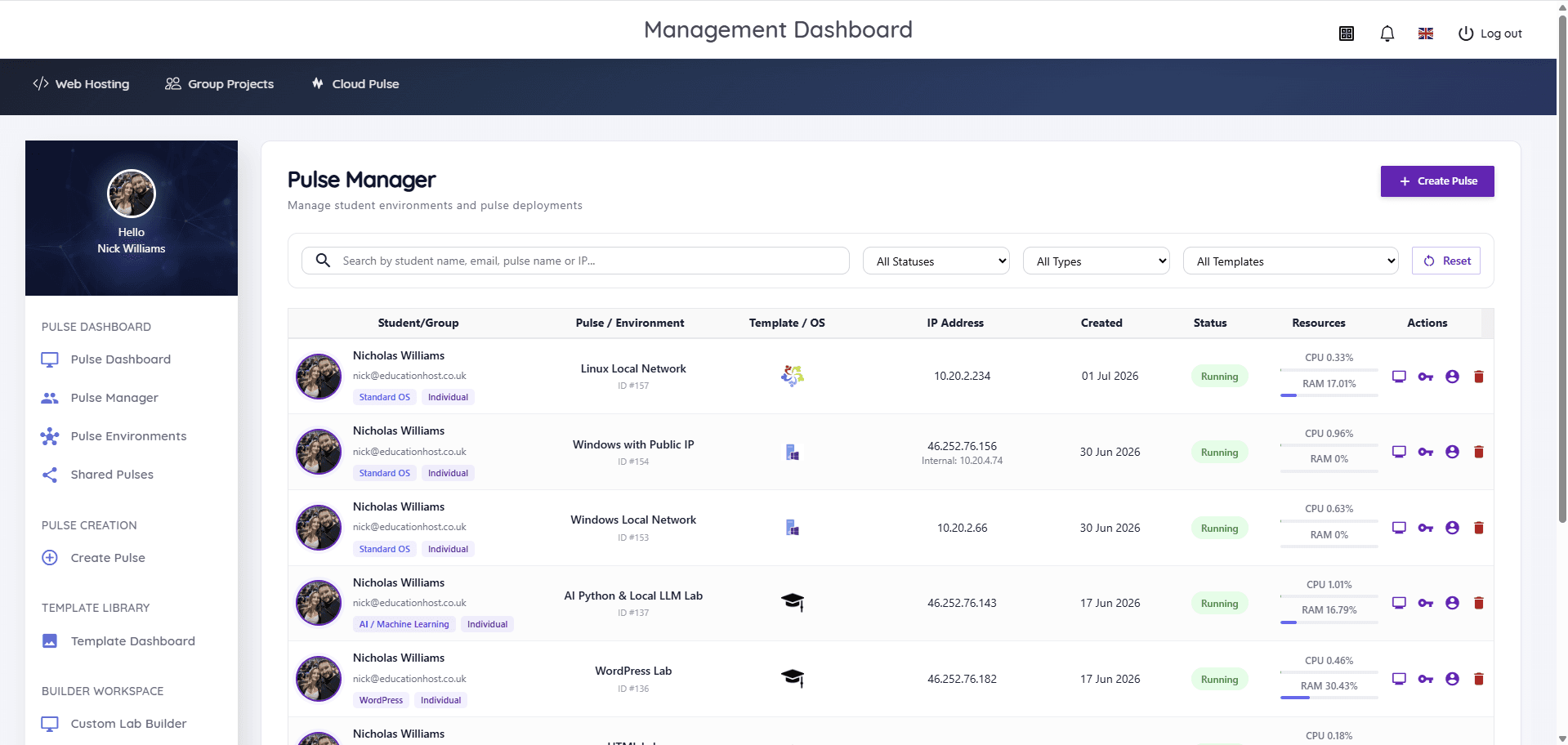
- Live per-student environment status and resource usage
- Reusable templates across cohorts, modules and academic years
What students and lecturers can do
Teaching time goes on AI, not on pip errors.
- Open a ready-made Python environment from any browser
- Work through notebook-based exercises with consistent libraries
- Train and evaluate small models within their own pulse
- Experiment with local LLM tooling, where the lab is configured for it
- Lecturers monitor progress and resource usage live across the cohort
- Reset a broken environment from the template in minutes
Example teaching activities
Module work that fits Cloud Pulse AI labs.
Python foundations series
Weekly notebook exercises in an identical environment — no first-week installation session required.
Classical ML coursework
Regression, classification and evaluation assignments using preloaded scientific Python libraries.
Local model experiment
Where configured, students run and probe a local LLM inside their pulse and analyse its behaviour critically.
Specialist module lab
A lecturer-built image with the exact toolchain a research-led module needs, saved as a template.
Which Education Host platforms fit this use case
AI and Python teaching is a core Cloud Pulse workload.
Cloud Pulse
Browser-based computing labs for universities
The lab platform — Python, notebooks and AI environments from reusable, lecturer-defined templates.
Explore Cloud PulseManaged Infrastructure
UK data-centre hosting, managed by Education Host
The managed UK infrastructure behind the labs, monitored and capacity-planned by Education Host.
Explore Managed InfrastructureConsultancy
Education platforms, data and digital operations
Education Host can help scope AI teaching environments, lab design and rollout across programmes.
Explore ConsultancyTeaching outcomes
- Modules start with AI content in week one, not environment setup
- Every student is assessed against the same environment
- Model experiments run in managed labs, not on student hardware
- Lab builds survive from year to year as templates
- Lecturers see who is running what, live, throughout the module
Explore related use cases
Scenarios institutions often pair with this one.
Data science & analytics
Reproducible data science environments — Python, notebooks, SQL and analysis tooling delivered identically to every student.
Explore use caseAPI development & cloud
REST APIs, JSON, authentication and cloud-style deployment taught in managed environments students reach from any browser.
Explore use caseLinux server administration
Root access to real Linux servers for every student — users, permissions, services and SSH practised in browser-based labs.
Explore use caseCyber security labs
Isolated, controlled lab environments for security teaching — private networks, Kali Linux images and multi-machine exercises within agreed boundaries.
Explore use caseAI & Python teaching labs — frequently asked questions
Direct answers about this use case and the Education Host platforms behind it.
- What are AI and Python teaching labs?
- They are managed, browser-accessed Python environments provided to a whole cohort from a single lecturer-defined template — notebooks, libraries and AI tooling ready to use, with no local installation.
- How does Education Host support AI teaching?
- Cloud Pulse delivers AI and Python lab environments as reusable templates, including Jupyter-style notebook workflows and — where configured — local LLM lab environments, with live lecturer monitoring across the cohort.
- Can students work with LLMs?
- Yes, where the lab is configured for it. Cloud Pulse supports local LLM lab environments so students can run and study models inside a managed pulse. Requirements for specific models are scoped with your module during onboarding.
- Do students need powerful laptops?
- No. The environments run on Education Host managed infrastructure and students access them through a browser, so coursework does not depend on personal hardware.
- Which Education Host platform is best for AI modules?
- Cloud Pulse. It provides the Python and AI lab environments, and Education Host consultancy can help scope lab design where a programme has specialist requirements.
- Can the same lab be reused next year?
- Yes. Labs are saved as templates in the Cloud Pulse Template Library and redeployed for each new cohort — updated once, used everywhere.
- How do we start?
- Book a consultation with Education Host — we'll scope your module's Python stack, notebook and model requirements, and set up a template ready for teaching.
See how this use case fits your institution
Tell us about your modules, cohorts and calendar, and we'll map this use case to the right Education Host platforms — including what to leave out.