
Cloud Pulse Teaching Labs
Browser-based computing labs for universities
Cloud Pulse lets lecturers create, deploy and manage student-ready teaching environments for AI, cyber security, Linux, Windows Server, web development and data science — accessed instantly through a browser, with no local installs and no rebuilding labs every semester.
- Launch student-ready environments from reusable templates
- Students work in the browser — any device, the same environment
- Build custom multi-machine labs for specialist modules
- See every student environment live from one dashboard
- Reuse templates across cohorts, modules and academic years
Built by Education Host for universities and colleges — part of the Education Host digital campus.
- Browser-based access
- Reusable teaching templates
- Custom Lab Builder
- Cohort & group deployment
- Live lecturer dashboard
- Linux, Windows & AI labs
Stop losing teaching time to local installs and inconsistent devices
Practical teaching should start with learning, not setup. Cloud Pulse removes the environment problems that slow down computing modules.
Software installation issues
Students arrive with different devices, operating systems and permission levels. Lecturers lose the first weeks of a module helping students install tools instead of teaching.
Inconsistent learning environments
What works on one student's laptop fails on another. With Cloud Pulse every student works in an identical, lecturer-defined environment for the module.
Complex lab builds and rebuilds
Building specialist lab environments by hand is slow and hard to repeat. Cloud Pulse turns them into templates you deploy again in minutes — next week or next year.
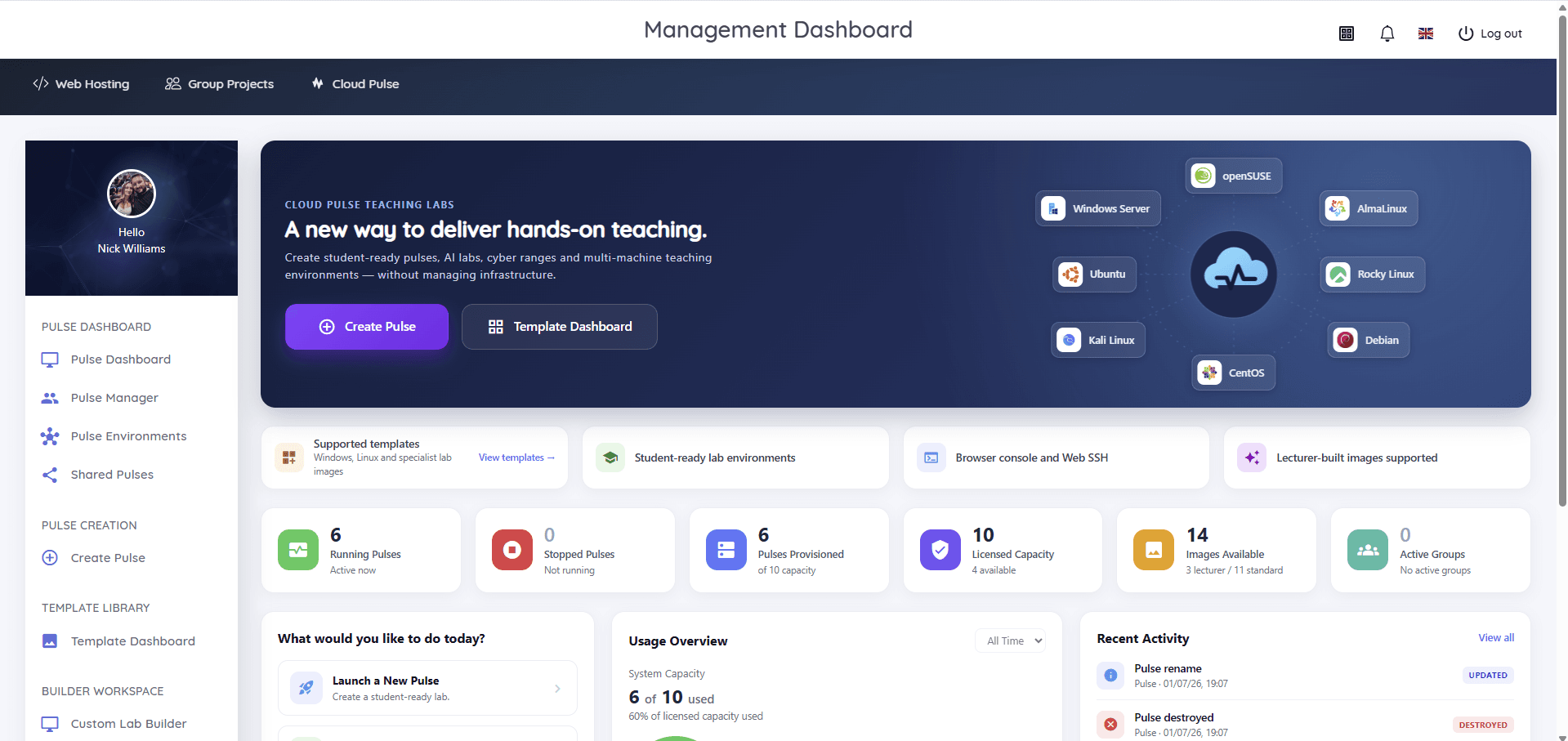
Real screens from Cloud Pulse
Every screenshot below is the actual platform — the dashboard, Template Library, Custom Lab Builder and Pulse Manager that lecturers and technical teams use day to day.
Create a lab once. Reuse it every semester.
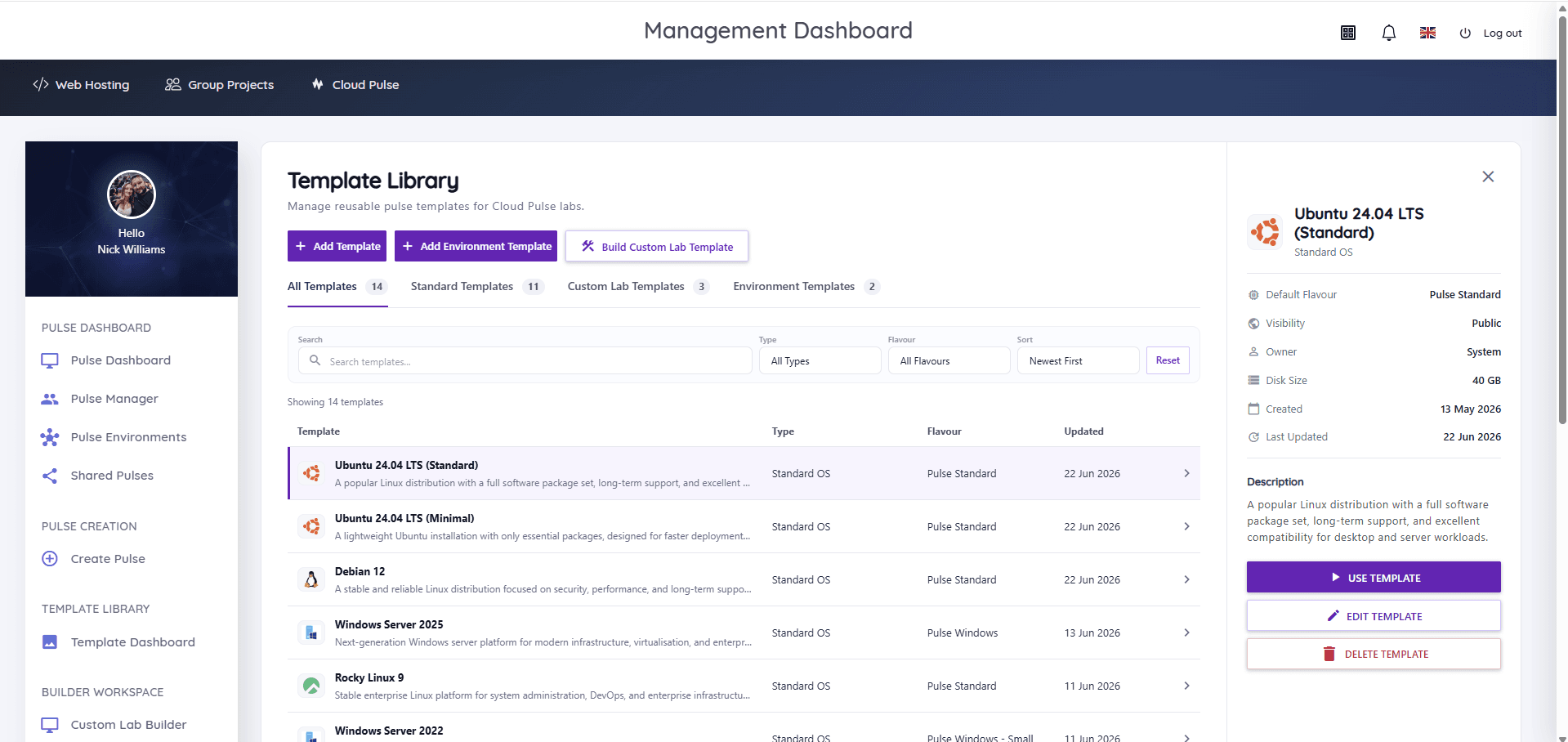
The Template Library holds your teaching environments as reusable templates — standard operating system builds, lecturer-built custom labs and full multi-machine environment templates. Set one up for a module, deploy it for the whole cohort, and bring it back for the next academic year without rebuilding anything.
- Standard templates for Ubuntu, Debian, Windows Server, Rocky Linux and more
- Custom lab templates built around a specific module
- Environment templates for complete multi-machine networks
- Search, type and flavour filters with visibility controls
- Update a template once — every future deployment uses the new build
Design specialist labs on a visual canvas
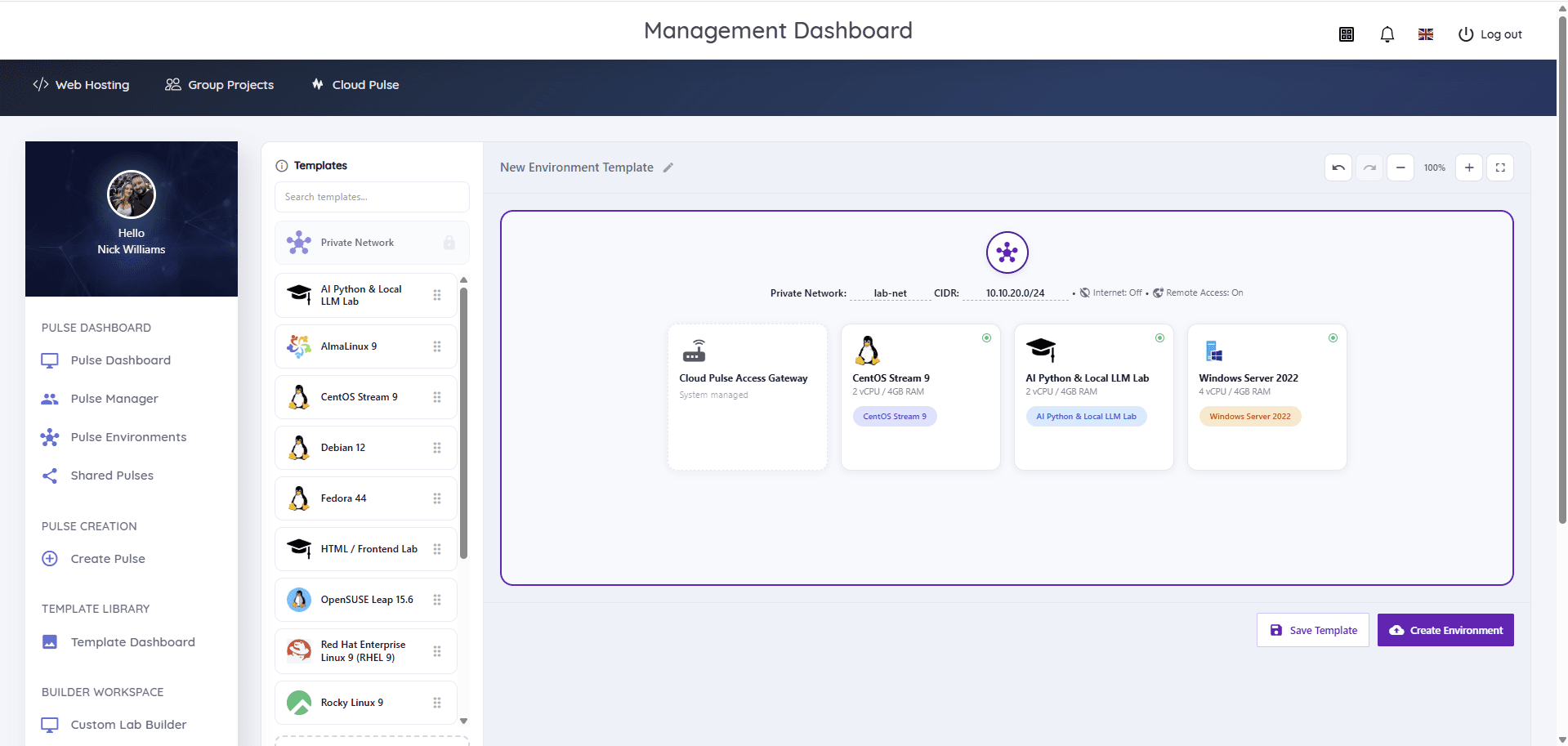
Some modules need more than a single machine. The Custom Lab Builder lets lecturers and technical teams compose multi-machine environments visually — a private lab network, a managed access gateway, and the mix of Linux, Windows and AI machines the exercise needs — then save the whole thing as a reusable environment template.
- Private lab networks with internet access off by default
- Combine machines — an AI lab, a Linux server and Windows Server in one environment
- Remote access handled by a system-managed gateway
- Save the finished design as an environment template
- Built for cyber security, networking and infrastructure exercises
Every student environment, visible and manageable
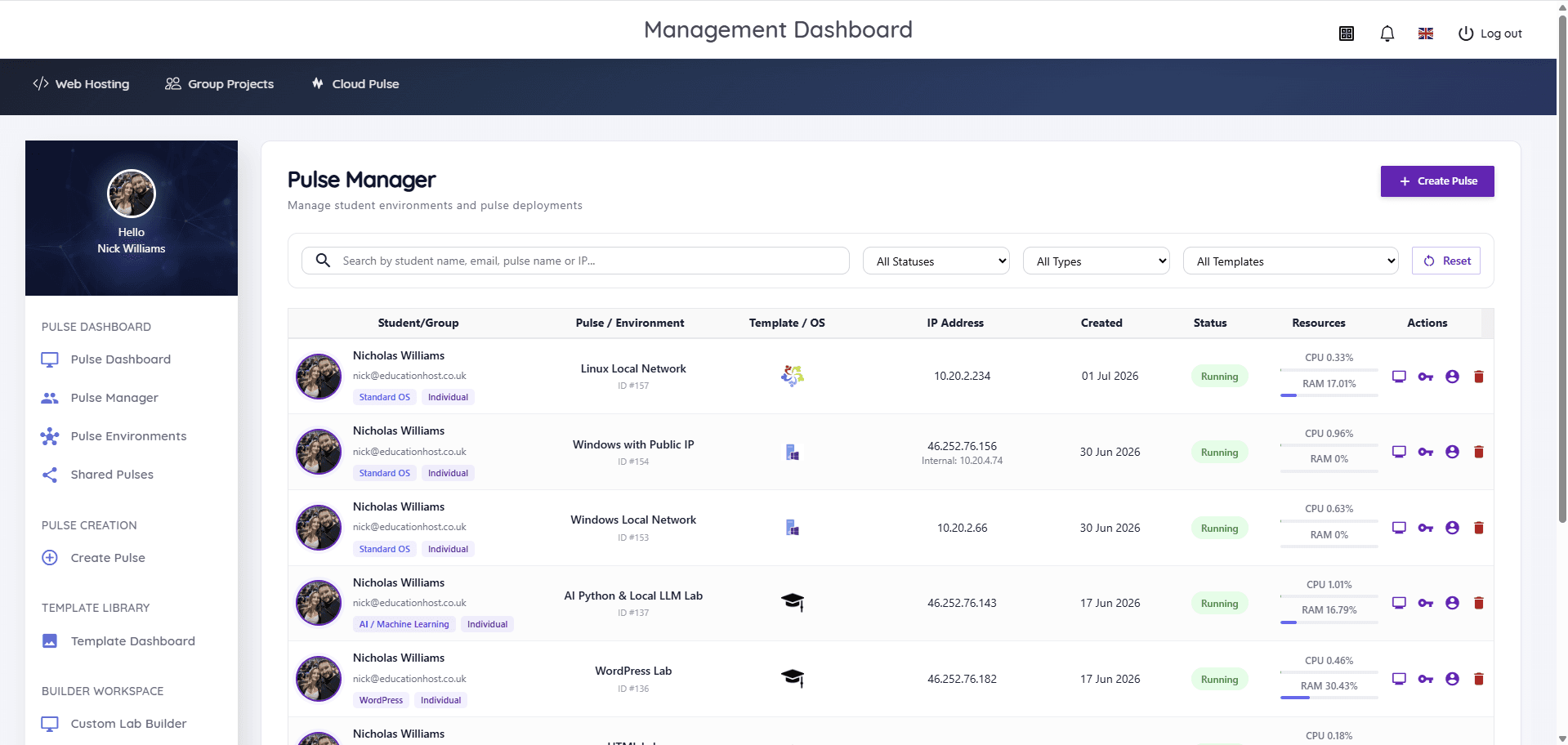
Pulse Manager gives lecturers and technical teams a live view of every student environment on the platform — who it belongs to, which template it runs, its status, and live CPU and memory usage. Console access is a click away, so helping a stuck student doesn't mean standing behind their laptop.
- Live status and resource usage for each environment
- Browser console and Web SSH access
- Filter by student, status, type or template
- Individual pulses, shared pulses and group environments
- Manage environments across the module — start, monitor and remove
What lecturers can do with Cloud Pulse
Cloud Pulse is lecturer-led: the people who teach the module shape the environment students learn in, without waiting on infrastructure work.
Create reusable templates
Turn a working module environment into a template and redeploy it for any future cohort in minutes.
Launch student-ready pulses
Deploy consistent environments for a whole teaching group — students start working, not installing.
Build custom lab environments
Compose specialist multi-machine labs on the visual canvas, including private networks and AI machines.
Run cohorts and group work
Provide individual environments, shared pulses or group environments to match how the module is taught.
See and support students live
Watch environment status and usage in real time and jump into a browser console to help.
Reuse labs every semester
Keep templates in the library and refresh environments each term instead of rebuilding physical labs.
Teaching labs for the modules universities actually run
Ready-to-use environments for the practical computing modules higher education teaches most.
AI & Python labs
Python, Jupyter and local LLM lab environments — students experiment with AI tooling inside a managed pulse instead of fighting their own laptops.
Cyber security labs
Isolated private lab networks with internet access off by default, Kali Linux images and multi-machine attack-and-defend style exercises.
Linux administration
Browser-based access to Ubuntu, Debian, Rocky Linux and RHEL-family servers for command-line, networking and system administration modules.
Windows Server
Windows Server 2022 and 2025 environments for infrastructure, directory services and virtualisation teaching — no local licensing headaches.
Web development & WordPress
HTML and frontend labs, WordPress environments and Linux web stacks for practical web development and CMS modules.
Data science & specialist labs
Lecturer-built images preloaded with the tools a specific module needs, saved as templates for the whole cohort.
Built for the platforms you teach on
Cloud Pulse provides teaching-ready lab environments across the operating systems computing departments rely on — as standard templates, ready to deploy.
 Ubuntu
 Debian
 AlmaLinux
 Rocky Linux
 openSUSE
 CentOS Stream
 Red Hat Enterprise Linux
 Windows Server
 Kali Linux
Plus Fedora, lecturer-built images and custom environment templates — if a module needs it, it can usually be delivered as a teaching-ready pulse template.
From template to taught session in four steps
Cloud Pulse keeps the workflow simple for lecturers and predictable for technical teams.
- 1
Choose or build a template
Start from a standard operating system template, or design a custom lab or multi-machine environment in the Custom Lab Builder.
- 2
Deploy for the cohort
Launch student-ready pulses for a module, teaching group or individual students — individually or as group environments.
- 3
Students open a browser
Students access their environment through the browser with console and Web SSH access — no installs, any device.
- 4
Manage, monitor and reuse
Watch live status and usage in Pulse Manager, support students in-session, and reuse the template next semester.
What universities get out of Cloud Pulse
Less setup, more teaching time
Practical sessions start with the subject, not thirty minutes of installation triage.
A consistent environment for every student
Every student gets the same lecturer-defined environment, whatever device they own.
Labs that survive the semester boundary
Templates live in the library and redeploy for the next cohort — no annual rebuild.
Specialist modules without local installs
AI, cyber security and infrastructure teaching runs in managed environments, not on student hardware.
Lecturer visibility and control
Live dashboards, per-student environment status and in-browser console access for support.
Less load on internal teams
Education Host manages the underlying infrastructure, so IT teams aren't running teaching labs by hand.
Secure access with institutional login
Cloud Pulse can integrate with institutional identity providers, including Microsoft Entra ID where required, so students and staff can access teaching labs using their existing university login.
“The platform's Single Sign-On (SSO) strengthens data privacy. Its scalable design significantly reduces administrative workload and improves the experience for both staff and students.”
Designed to work alongside Education Host's other platforms
Cloud Pulse is one part of the Education Host digital campus. It sits alongside Student Web Host Manager for student web hosting, and the managed infrastructure that underpins both — so teaching labs, student hosting and identity-integrated access come from one education-focused partner.
Built by the Education Host team trusted by education institutions
Education Host supports universities, colleges and schools across hosting, student platforms and education-focused cloud services — including institutions such as Arden University, Canterbury Christ Church University and Atlantic Technological University.



Institutions shown are Education Host customers across our wider platform and service portfolio.
Cloud Pulse — frequently asked questions
Answers to common questions about Cloud Pulse browser-based computing labs and education virtual machines.
- What is Cloud Pulse?
- Cloud Pulse is Education Host's browser-based computing lab platform for higher education. Lecturers create and manage student-ready pulses — education virtual machines and multi-machine teaching environments — that students access instantly through a web browser.
- What are browser-based computing labs?
- Browser-based computing labs are teaching environments that run in the cloud and are accessed through a web browser, rather than installed on student devices or physical lab machines. Every student gets the same environment, on any device, without local installation.
- Who is Cloud Pulse for?
- Cloud Pulse is built for universities and colleges — lecturers who run practical computing modules, and the technical and IT teams who support them. It suits any department teaching hands-on computing, from computer science to cyber security and data science.
- What subjects and modules can Cloud Pulse support?
- Cloud Pulse supports practical teaching across AI and Python, cyber security, Linux administration, Windows Server, web development and WordPress, networking and data science — plus specialist modules using lecturer-built images and custom lab templates.
- Can lecturers create their own lab environments?
- Yes. Lecturers can build custom lab environments in the Custom Lab Builder — including private networks and multi-machine designs — save them as reusable templates, and use lecturer-built images preloaded with module-specific tools.
- What operating systems does Cloud Pulse support?
- Cloud Pulse provides standard templates for Ubuntu, Debian, AlmaLinux, Rocky Linux, openSUSE, CentOS Stream, Red Hat Enterprise Linux, Fedora, Windows Server and Kali Linux, alongside custom and lecturer-built environments.
- How do students access Cloud Pulse?
- Students access their environments through a web browser, with in-browser console and Web SSH access. Where an institution configures SSO, students sign in with their existing university login, including Microsoft Entra ID.
- Why use Cloud Pulse instead of local installs?
- Local installs depend on each student's device, operating system and permissions, and consume teaching time in setup and troubleshooting. Cloud Pulse gives every student an identical, ready-to-use environment in the browser, and lets lecturers see and support environments centrally.
- Can Cloud Pulse support AI, cyber security and Linux teaching?
- Yes. Cloud Pulse runs AI and Python labs including local LLM environments, isolated cyber security labs with private networks and Kali Linux, and Linux administration environments across the major distributions.
- Can lab environments be reused across semesters?
- Yes. Environments are saved as templates in the Template Library, so a module's lab can be redeployed for each new cohort or academic year without rebuilding it.
- Is Cloud Pulse suitable for higher education?
- Yes — Cloud Pulse is designed specifically for higher education teaching, and is part of the Education Host digital campus alongside Student Web Host Manager and Education Host's managed infrastructure for universities and colleges.
See Cloud Pulse with your modules in mind
Book a short demo and we'll walk through the dashboard, Template Library and Custom Lab Builder — and how Cloud Pulse would support the modules you teach.