
Use case — AI, Data & Cloud
Cyber security labs for practical teaching
Security skills have to be practised somewhere safe. Cloud Pulse provides isolated cyber security teaching labs — private lab networks with internet access off by default, Kali Linux images and multi-machine exercises — inside controlled environments with agreed acceptable-use boundaries.
- Isolated private lab networks, internet access off by default
- Kali Linux images and multi-machine lab designs
- Attack-and-defend style exercises in controlled teaching environments
- Remote access through a system-managed gateway
- Lab templates reused across cohorts and years
A use case supported by Education Host — platforms, hosting and infrastructure built exclusively for education.
The challenge: security teaching needs isolation by design
You cannot teach vulnerability analysis on the open network — and you should not teach it on student laptops either.
Exercises must be contained
Scanning, exploitation practice and traffic analysis belong inside isolated networks that cannot reach real systems.
Multi-machine labs are hard to build
A realistic exercise needs attacker and target machines on a private network — slow to assemble by hand and slower to rebuild.
Governance has to be explicit
Institutions need clear acceptable-use boundaries around security teaching, not informal arrangements on shared kit.
How Education Host supports cyber security teaching
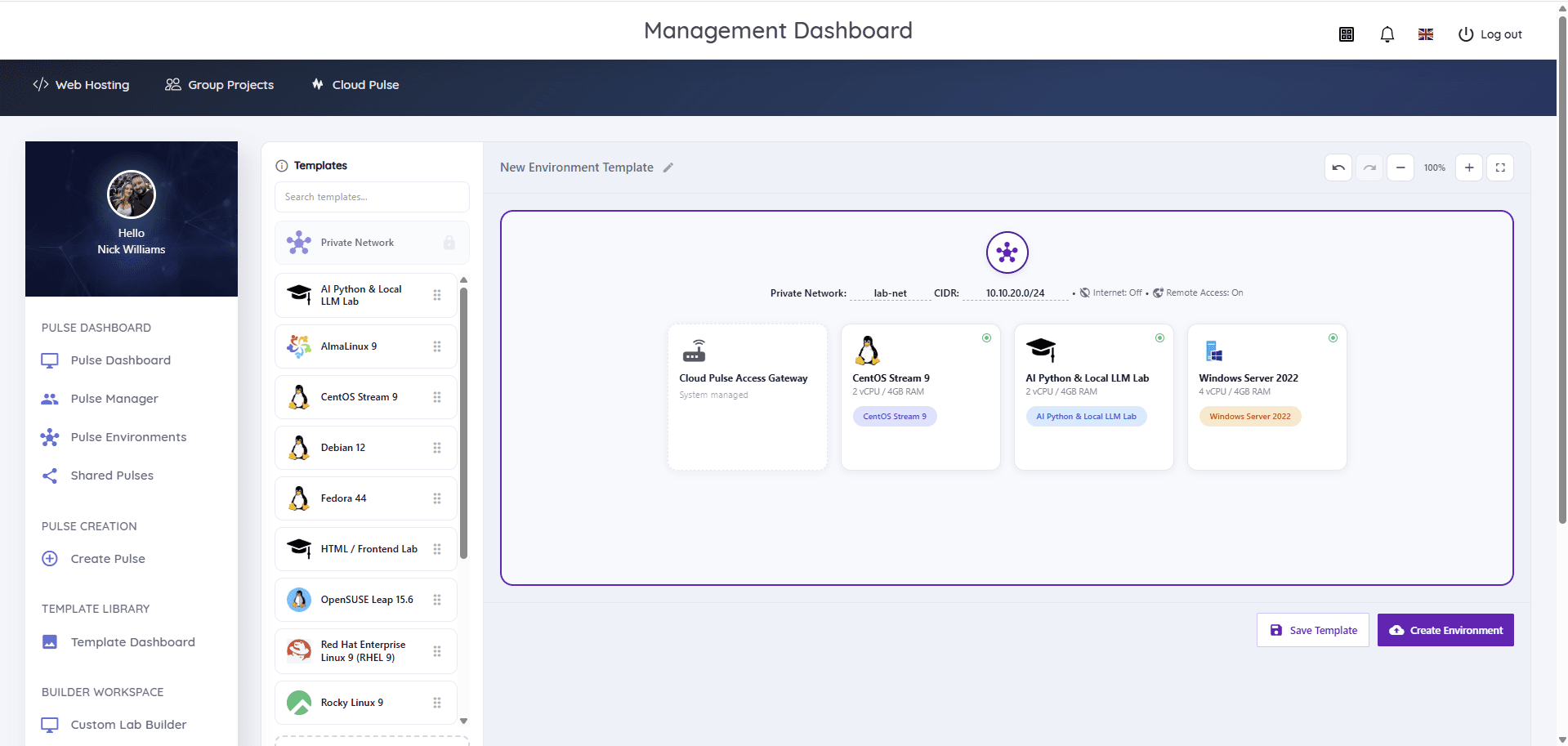
Cloud Pulse is built for exactly this: the Custom Lab Builder composes multi-machine security labs on a visual canvas — private lab networks with internet access off by default, a system-managed access gateway, and the mix of Kali Linux, other Linux distributions and Windows Server machines the exercise needs.
Labs run as controlled teaching environments within acceptable-use boundaries agreed with the institution. Exercises stay inside the isolated lab network, lecturers see every environment live in Pulse Manager, and the whole lab is saved as a template and redeployed for each cohort.
- Private, isolated lab networks — internet access off by default
- Kali Linux images alongside Linux and Windows Server targets
- Multi-machine attack-and-defend style exercises
- System-managed gateway for controlled remote access
- Acceptable-use boundaries agreed with the institution
- Whole labs saved as templates and reused every year
What students and lecturers can do
Realistic practice, contained by design.
- Practise reconnaissance, scanning and analysis against lab targets
- Work through vulnerability testing exercises in isolated environments
- Run capture-the-flag style challenges inside the lab network, where appropriate
- Analyse traffic and logs across a private multi-machine network
- Lecturers watch environments live and assist through the browser console
- Reset compromised machines from the template between sessions
Example teaching activities
Security exercises that fit isolated Cloud Pulse labs.
Attack-and-defend lab
A Kali machine and vulnerable targets on a private network — students find, exploit and then patch weaknesses.
Network analysis exercise
Capture and interpret traffic within the lab network to identify services, behaviour and anomalies.
CTF-style assessment
A capture-the-flag style challenge run inside the isolated lab, where appropriate to the module and institution.
Hardening assignment
Students take a deliberately weak server, audit it and defend their remediation choices.
Which Education Host platforms fit this use case
Cyber security labs are a flagship Cloud Pulse workload.
Cloud Pulse
Browser-based computing labs for universities
Isolated multi-machine security labs — private networks, Kali images and reusable templates via the Custom Lab Builder.
Explore Cloud PulseManaged Infrastructure
UK data-centre hosting, managed by Education Host
The monitored UK infrastructure the labs run on, isolated from institutional production systems.
Explore Managed InfrastructureConsultancy
Education platforms, data and digital operations
Education Host can help scope lab designs, acceptable-use boundaries and module rollout with your teaching and IT teams.
Explore ConsultancyTeaching outcomes
- Students practise offensive and defensive techniques safely and lawfully
- Every exercise stays inside isolated, controlled environments
- Multi-machine labs deploy in minutes instead of days of setup
- Compromised machines reset cleanly between teaching sessions
- The institution keeps explicit governance over security teaching
Explore related use cases
Scenarios institutions often pair with this one.
Networking labs
Controlled multi-machine environments for networking teaching — IP addressing, services, DNS and client–server exercises without touching production networks.
Explore use caseLinux server administration
Root access to real Linux servers for every student — users, permissions, services and SSH practised in browser-based labs.
Explore use caseWindows Server administration
Windows Server 2022 and 2025 teaching environments — server roles, remote administration and directory services concepts without local licensing headaches.
Explore use caseAI & Python teaching labs
Python, notebooks and AI fundamentals in browser-based labs — every student in an identical, lecturer-defined environment.
Explore use caseCyber security labs — frequently asked questions
Direct answers about this use case and the Education Host platforms behind it.
- What are cyber security teaching labs?
- They are isolated, controlled lab environments where students practise security techniques — scanning, vulnerability testing, analysis and defence — against lab targets on private networks, never against real systems.
- How does Education Host support cyber security teaching?
- Cloud Pulse provides multi-machine security labs through its Custom Lab Builder: private lab networks with internet access off by default, Kali Linux images, a system-managed access gateway and templates that redeploy for every cohort.
- Are the labs isolated from real networks?
- Yes. Security labs run on private lab networks with internet access off by default, with remote access handled through a system-managed gateway — exercises are contained within the teaching environment.
- Can students use Kali Linux?
- Yes. Cloud Pulse provides Kali Linux images as standard templates, which can be combined with Linux and Windows Server targets in multi-machine lab designs.
- Can this support capture-the-flag exercises?
- Yes, where appropriate. CTF-style challenges can run inside the isolated lab network, designed with the module team and within the institution's acceptable-use boundaries.
- What are the acceptable-use boundaries?
- Security labs operate as controlled teaching environments under acceptable-use boundaries agreed with each institution during scoping — Education Host does not provide environments for activity against real systems.
- Which Education Host platform is best for security teaching?
- Cloud Pulse. Managed Infrastructure underpins it, and Education Host consultancy can help scope lab designs and governance with your teams.
- How do we start?
- Book a consultation with Education Host — we'll scope your module's lab designs, isolation requirements and acceptable-use boundaries with your teaching and IT teams.
See how this use case fits your institution
Tell us about your modules, cohorts and calendar, and we'll map this use case to the right Education Host platforms — including what to leave out.