
Platform
Cover management software built around the school day
Cover Manager is an MIS-integrated school cover management platform. Manage staff absence requests, approvals, cover allocation, Morning Cover planning, cover work and daily cover sheets — with timetable context from MIS data — in one secure place.
- Approve staff absence requests
- See approved but unallocated sessions
- Allocate cover quickly
- Print or export the daily cover sheet
- See subject, group, room and period context from MIS data
Cover Manager by Education Host — designed and developed for UK schools and colleges.
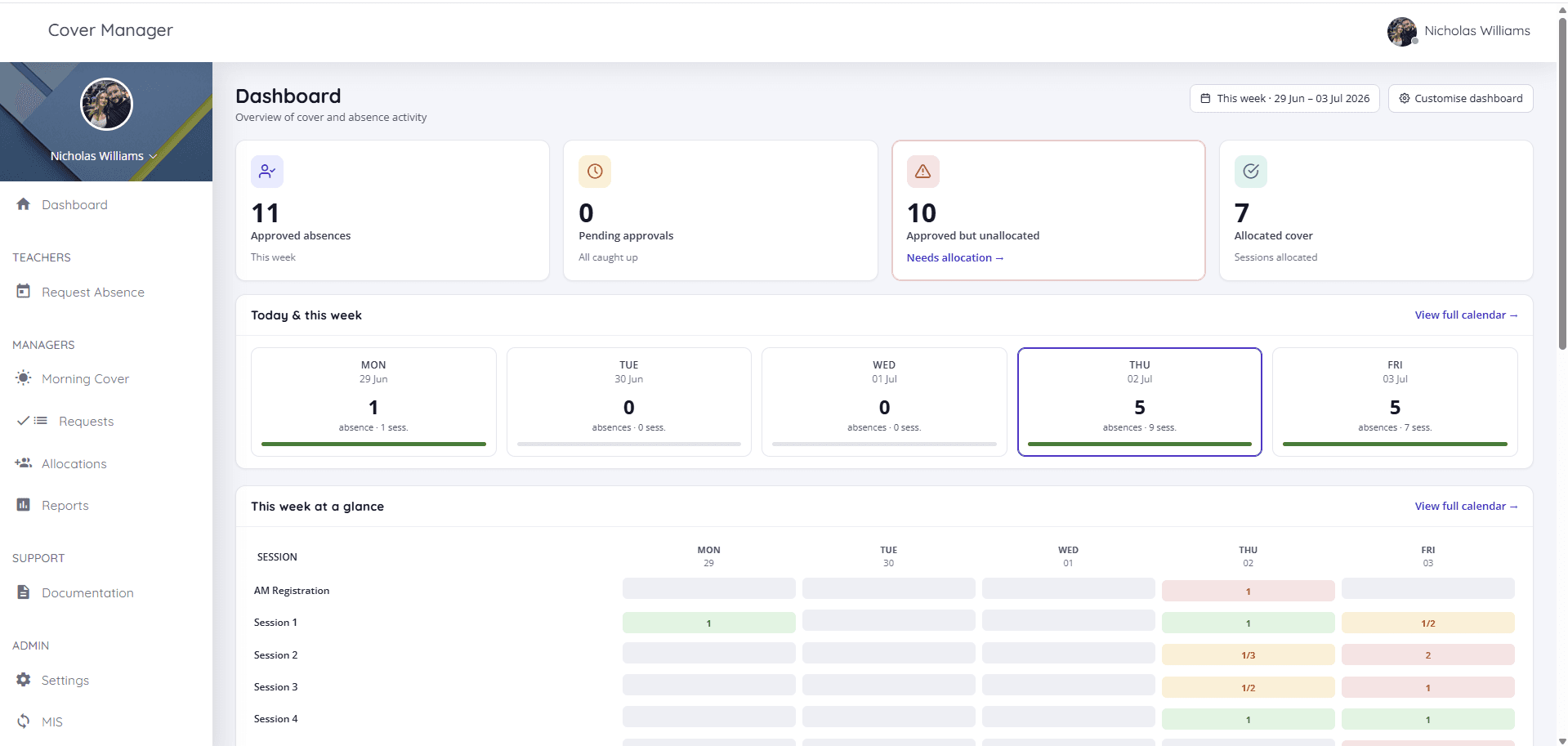
Real screens from Cover Manager
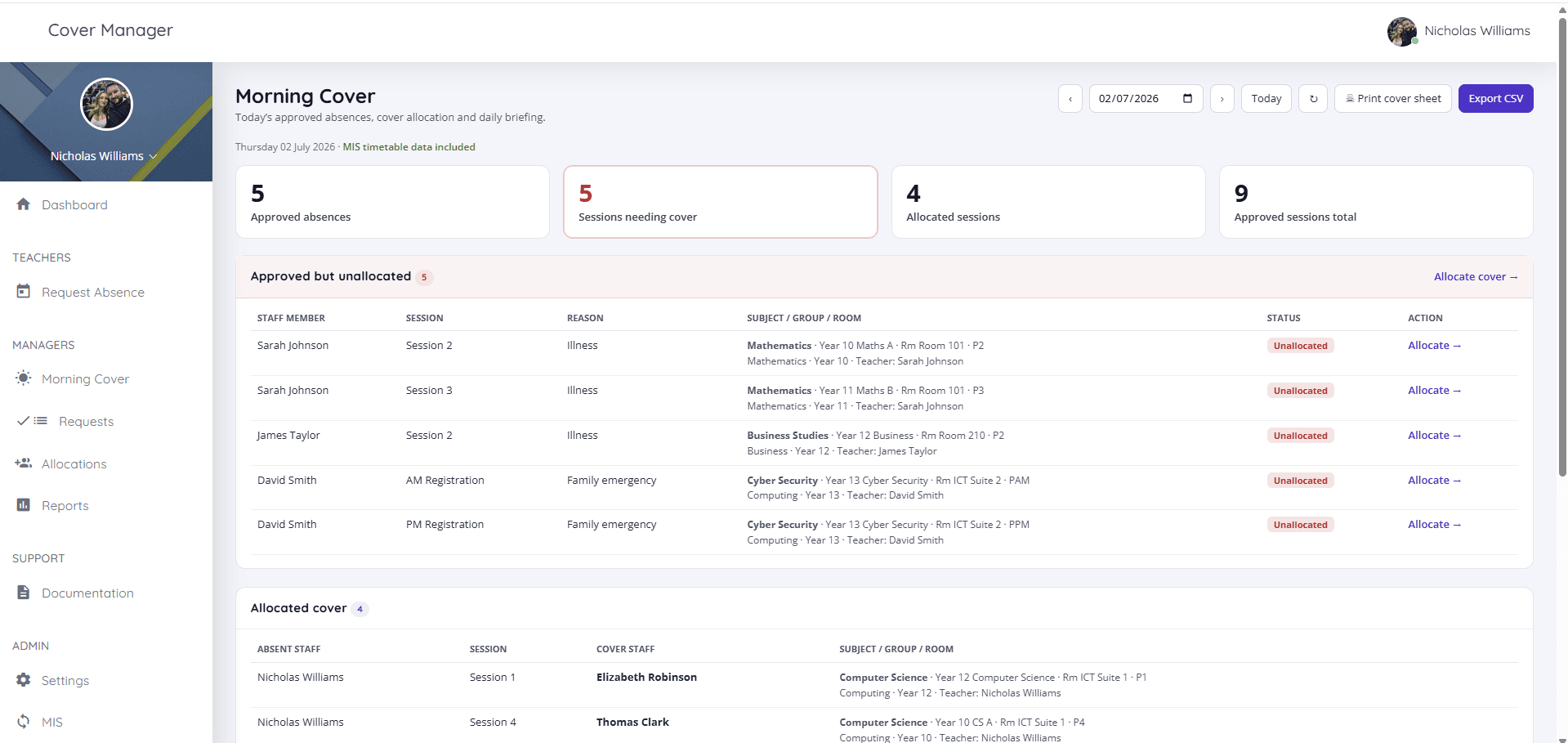
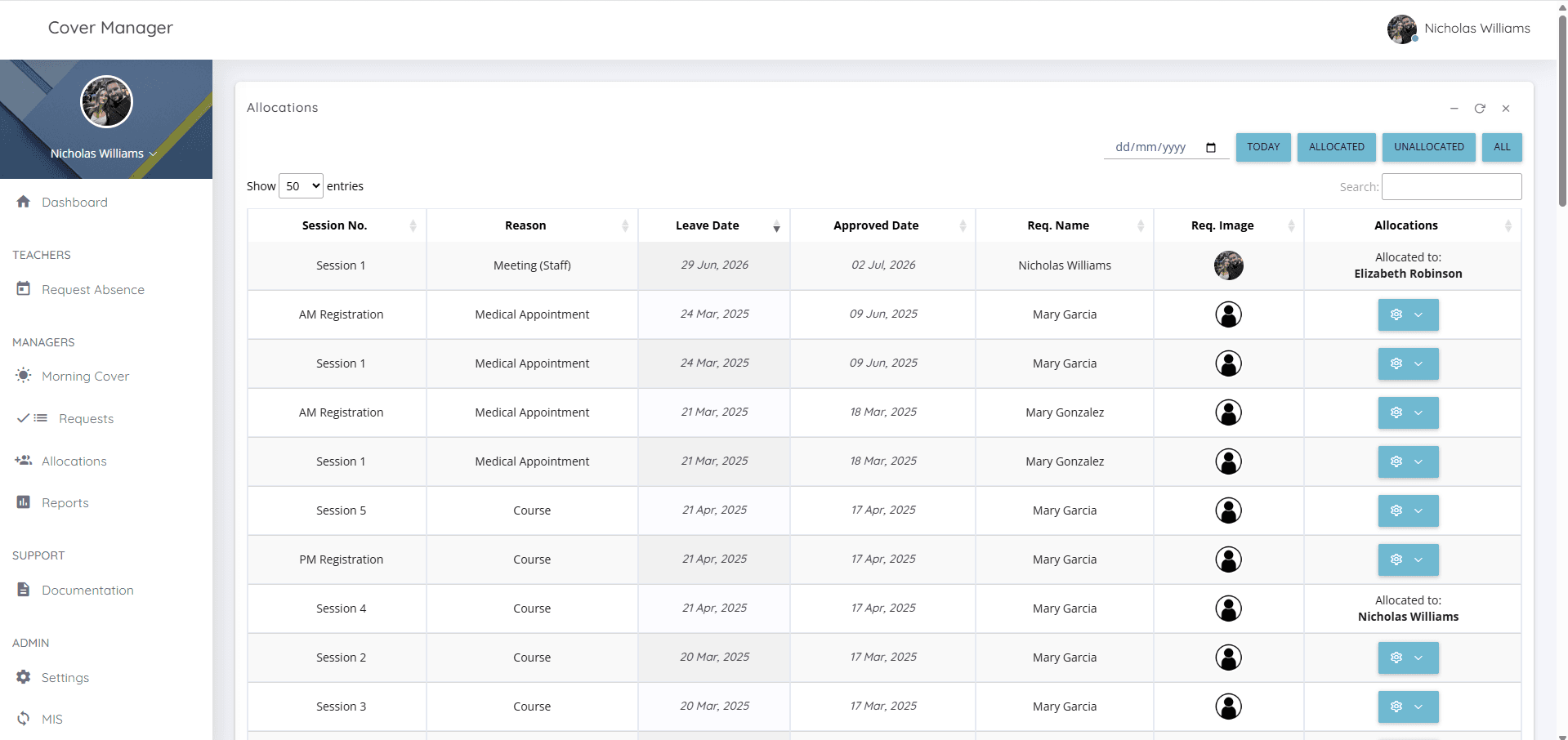
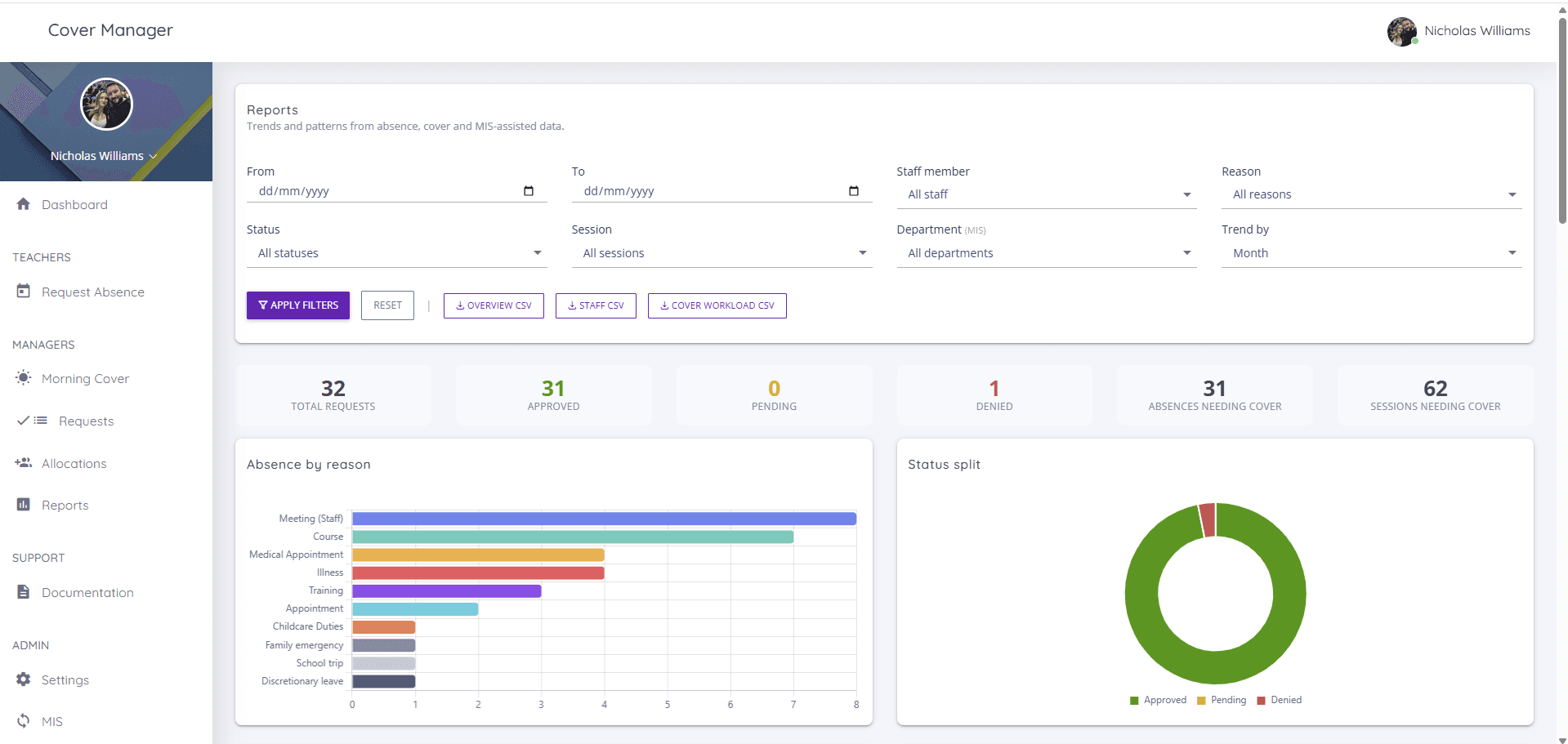
Every screenshot below is the actual platform — the Morning Cover, dashboard, allocation and reporting views cover teams use day to day.
What is Cover Manager?
Cover Manager is a school-focused platform for managing staff absence and cover. It brings requests, approvals, allocation, daily cover planning, cover work and reporting into one place, so cover teams can move quickly and keep everyone working from the same information.
It is not just a calendar. Cover Manager is an operational control panel for school cover — from the moment a member of staff requests absence, through manager approval, to allocating cover and printing the daily cover sheet.
Designed and developed by Education Host around real school workflows, Cover Manager is cloud-hosted, supports Microsoft Entra sign-in, uses role-based access so each person sees only what they need, and treats cover work as optional — schools that only want absence, approval and allocation workflows can switch it off.
Built for the 8am cover rush
When staff absence comes in, cover managers need to know what is approved, what is still unallocated, which lessons are affected and what needs to go on the daily cover sheet. Morning Cover brings all of it into one daily operational view — approved absences, allocated and unallocated sessions, MIS timetable context where available, and a printable cover sheet.
- Daily view of approved absences
- Approved but unallocated sessions highlighted
- Allocated cover shown clearly
- Partial allocation handled properly
- Print-friendly daily cover sheet
- CSV export for sharing or archiving
- MIS subject, group, room and period context where available
From spreadsheets and guesswork to one daily cover view
Without Cover Manager
- Absence requests handled through email or spreadsheets
- Cover gaps found manually
- Daily cover sheet built separately
- Timetable context checked in another system
- Cover work status unclear
With Cover Manager
- Requests, approvals and allocation visibility in one system
- Approved but unallocated sessions highlighted
- Morning Cover gives a daily operational view
- MIS timetable context shown where available
- Daily cover sheet printed or exported from the platform
Approval workflows that match school responsibility
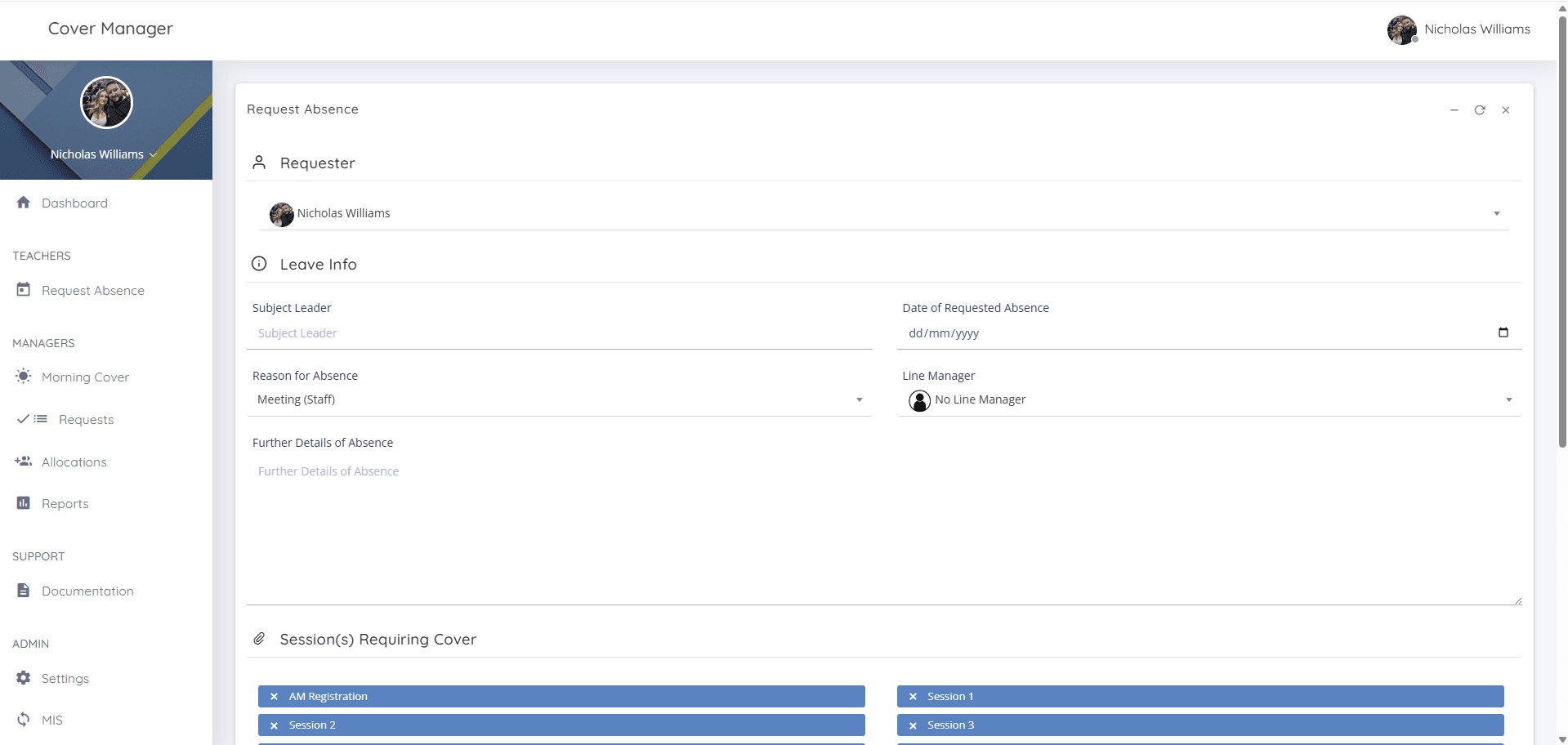
Staff can request absence and managers can review, approve or reject requests based on school roles and responsibilities. Cover Manager supports line managers, cover managers, headteachers, administrators and staff users, with access limited to what each person needs.
- Staff submit absence requests with the sessions that need cover
- Managers and headteachers review each request
- Approve or deny with a reason
- Approved requests feed straight into the dashboard and allocation views
- An audit-friendly workflow — decisions are recorded, not lost in email
Know exactly what is still unallocated
Once absence is approved, Cover Manager helps managers see which sessions still need cover. The dashboard and Morning Cover view highlight approved but unallocated sessions, partially allocated days and fully allocated cover, helping teams focus on what still needs action.
- Approved but unallocated count on the dashboard
- Allocated vs unallocated status per session
- Partial allocation visibility
- Deep links straight into Allocations
- A daily operational view for cover teams
MIS-integrated cover planning
Cover Manager is built to work with school MIS and timetable data through Wonde. This allows approved absences, cover allocation and Morning Cover to be enriched with the lesson context cover teams need — including subject, teaching group, room, period, department, year group and original teacher where available.
Cover Manager can use Wonde-connected MIS and timetable data to show what is actually affected by an absence — which class, which room, which period and which subject — so cover teams can make faster decisions and produce clearer daily cover sheets.
- Subject, group and room context on affected sessions
- Period and timetable information in Morning Cover
- Department and year group context where available
- Original teacher shown on daily cover rows
- Better daily cover sheets with timetable detail
- Reduced manual checking between systems
Connect Cover Manager to your school MIS through Wonde
Cover Manager uses Wonde to connect with the MIS and timetable data your school already maintains, helping cover teams see subject, group, room, period and teacher context alongside approved absences and daily cover planning.
One connection route for MIS context
Wonde provides a secure connection between schools and approved third-party applications. Cover Manager can use this route to bring timetable context into Morning Cover, Allocations and the daily cover sheet.
Your school MIS
- SIMS
- Arbor
- Bromcom
- iSAMS
- IRIS
…and other Wonde-connected systems
Wonde
Secure MIS connection route
Cover Manager
Timetable context, where cover teams need it
- Morning Cover
- Allocations
- Daily cover sheet
Through Wonde, Cover Manager can support schools using leading MIS and timetable systems including SIMS, Arbor, Bromcom, iSAMS, IRIS and others, subject to onboarding, permissions and the data available from the school's MIS.
Availability depends on the school's MIS, Wonde permissions and the timetable data made available during onboarding.
Cover work when you need it, hidden when you do not
Some schools want to collect cover work and instructions through the system. Others only need absence approval and allocation visibility. Cover Manager supports both approaches. Cover Work can be enabled or disabled in settings, and the interface adapts so schools only see what they use.
- Attach instructions and work to cover sessions
- Track whether cover work has been added
- Disable Cover Work entirely if not required
- Existing cover work data is preserved if re-enabled
Dashboards and reports for cover visibility
Cover Manager gives managers visibility across absence activity, pending approvals, unallocated sessions, allocation status and trends. Reports help schools understand absence patterns, cover workload and operational pressure over time.
- Dashboard KPIs for the week — approvals, allocation, absences
- Pending approvals at a glance
- Allocation status across sessions
- Absence trends by reason over time
- Cover workload across staff
- Reports filtered by reason, date, session or staff where available
Secure sign-in and role-based access
Cover Manager supports Microsoft Entra sign-in using MSAL and keeps access role-based. Staff, line managers, cover managers, headteachers and administrators see the tools appropriate to their role.
- Microsoft Entra (Azure AD) sign-in using MSAL
- Role-based access for staff, line managers, cover managers, headteachers and admins
- Manager-only views such as Morning Cover and Allocations
- Audit-friendly approval and allocation workflow
- Admin-controlled settings, users and access levels
- Cloud-hosted by Education Host on a school subdomain (school.covermanager.co.uk), with backups and support included
From absence request to daily cover sheet
The whole cover workflow, in six steps.
- 1
Staff request absence
A member of staff submits an absence request with the sessions that need cover.
- 2
Manager reviews
A line manager or headteacher reviews the request and approves or rejects it.
- 3
Approved absence appears
Approved absences show immediately on the dashboard and in Morning Cover.
- 4
Unallocated sessions surface
The cover manager sees exactly which approved sessions still need cover.
- 5
Cover is allocated
Cover is allocated to staff, with partial allocation handled properly.
- 6
Daily cover sheet goes out
The cover sheet is printed or exported, and staff can see their cover.
Built for the people who run school cover
Cover managers
Run Morning Cover, allocate sessions and keep the day on track.
Headteachers & senior leaders
Approve requests and keep oversight of absence and cover pressure.
Line managers
Review and approve absence requests for their teams.
School administrators
Manage users, roles, settings and day-to-day admin.
Teaching & support staff
Request absence and see their own cover clearly.
IT / MIS teams
Microsoft Entra sign-in, role-based access and MIS-aware timetable context.
See it in a demo
Cover Manager is available from Education Host and is ready to demo. Pricing is confirmed as part of a demo and scoping conversation — book a demo to see the platform and discuss what's right for your school.
Cover Manager — frequently asked questions
Answers to common questions about Cover Manager, Education Host's school cover management software.
- What is Cover Manager?
- Cover Manager by Education Host is MIS-integrated school cover management software. It manages staff absence requests, approval workflows, cover allocation, Morning Cover planning, optional cover work and printable daily cover sheets in one cloud-hosted platform, with timetable context from MIS data where available.
- What is Morning Cover?
- Morning Cover is Cover Manager's daily operational view for cover teams. It shows today's approved absences, the sessions that are still unallocated, the cover already allocated and the MIS timetable context behind each session — and produces the printable daily cover sheet and CSV export for the school day.
- Who is Cover Manager for?
- Schools and colleges — specifically cover managers, headteachers and senior leaders, line managers, school administrators, teaching and support staff, and the IT or MIS teams who look after school systems.
- Does Cover Manager handle approval workflows?
- Yes. Staff submit absence requests and managers or headteachers review them, approving or denying with a reason. Approved requests feed directly into the dashboard, Morning Cover and allocation views.
- Can Cover Manager show approved but unallocated cover?
- Yes. The dashboard and Morning Cover highlight approved but unallocated sessions, including partially allocated days, so cover teams can see exactly what still needs action.
- Can Cover Manager create a daily cover sheet?
- Yes. Morning Cover produces a print-friendly daily cover sheet and a CSV export, including MIS subject, group, room and period context where timetable data is available.
- Does Cover Manager integrate with our MIS?
- Yes. Cover Manager is built to connect to school MIS and timetable data through Wonde. Where the relevant data is available, Cover Manager can show subject, group, room, period, department, year group and original teacher context in Morning Cover, Allocations and the daily cover sheet.
- Which MIS systems can Cover Manager work with?
- Through Wonde, Cover Manager can support schools using leading MIS systems such as SIMS, Arbor, Bromcom, iSAMS, IRIS and others. The exact setup depends on your school's MIS, Wonde permissions and the timetable data available during onboarding.
- Is Xporter supported?
- Cover Manager has been designed with alternative MIS integration routes in mind. Wonde is the primary MIS connection route for launch, and other routes can be scoped where needed.
- Does Cover Manager show subject, group, room and period?
- Yes — where MIS timetable data is available, Cover Manager shows subject, group, room and period against affected sessions, along with department, year group and original teacher context, in Morning Cover, allocations and the daily cover sheet.
- Can Cover Work be disabled?
- Yes. Cover Work can be enabled for schools that want to collect work and instructions through the platform, or disabled for schools that only want absence, approval and allocation workflows. The interface adapts either way, and existing cover work data is preserved if it is re-enabled.
- Does Cover Manager support Microsoft Entra sign-in?
- Yes. Cover Manager supports Microsoft Entra (Azure AD) sign-in using MSAL, alongside role-based access so each user only sees the tools appropriate to their role.
- Is Cover Manager cloud-hosted?
- Yes. Cover Manager is cloud-hosted by Education Host on a school subdomain in the format school.covermanager.co.uk, with data backups and a support allocation included.
- Can we book a demo?
- Yes — book a Cover Manager demo with Education Host to see absence requests, approvals, Morning Cover, MIS timetable context, allocation and the daily cover sheet in action, and to discuss pricing and setup for your school.
See Cover Manager in a demo
See staff absence requests, approval workflows, MIS timetable context, unallocated sessions and the daily cover sheet in action.