
Student Web Host Manager
Student web hosting, governed at institutional scale
Student Web Host Manager helps universities and colleges provision, manage and govern student web hosting accounts across courses, modules, teaching blocks and campuses — with Microsoft Entra sign-in, cPanel access and lifecycle automation.
- Provision student hosting accounts at scale
- Microsoft Entra / Azure AD single sign-on
- Course, module and teaching block management
- Student dashboard and cPanel access
- Suspension, archival and lifecycle controls
- Built for education workflows
Built by Education Host for universities and colleges — part of the Education Host digital campus.
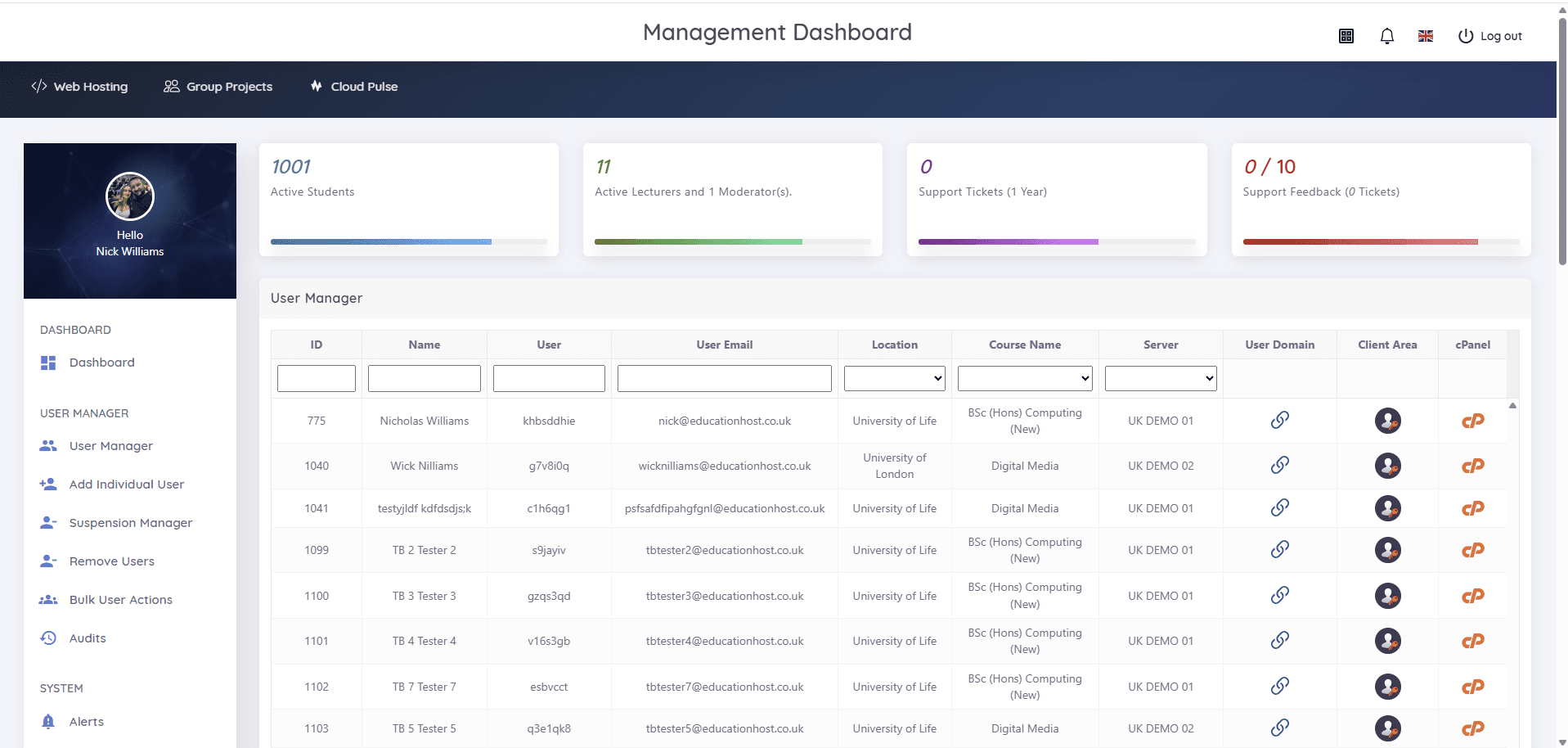
Real screens from Student Web Host Manager
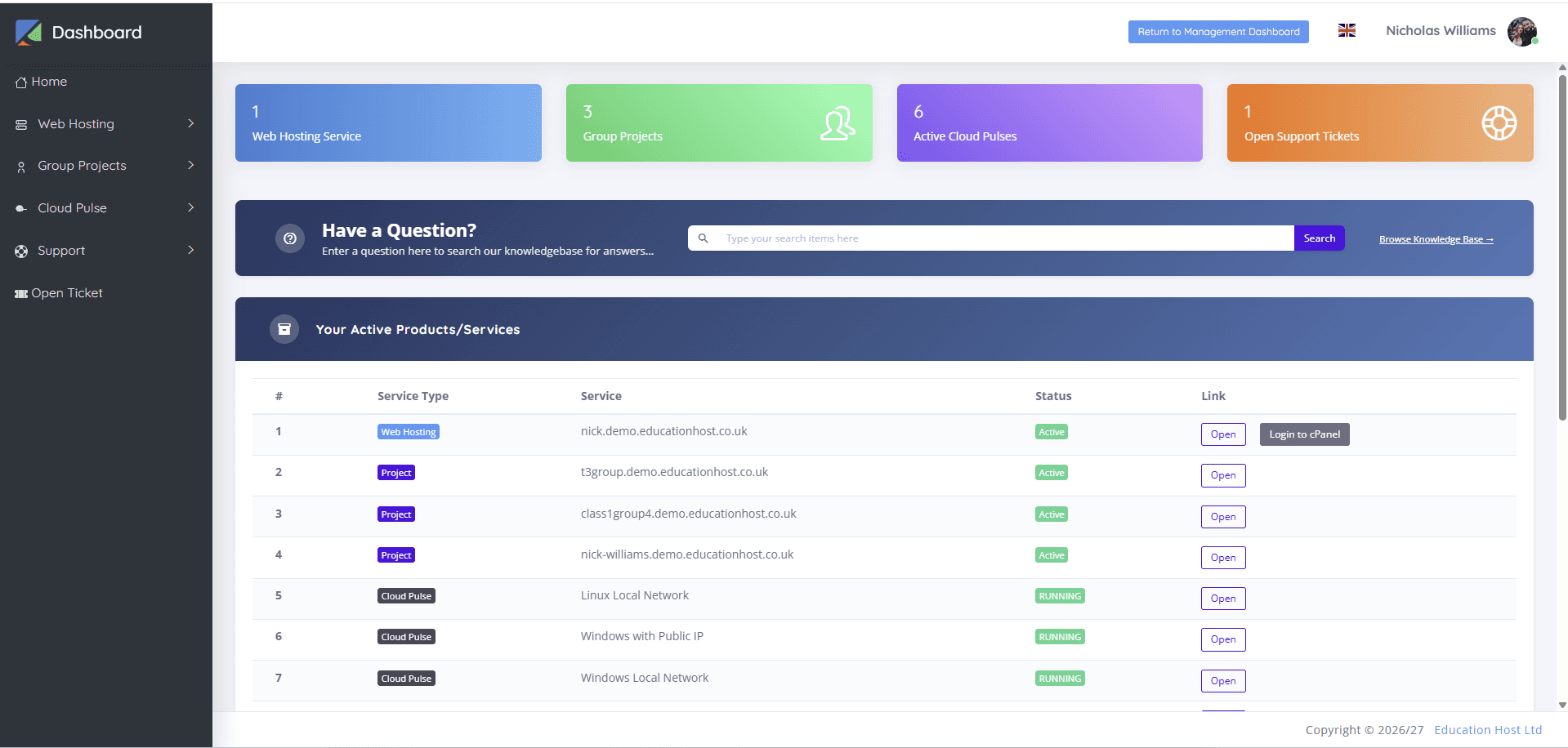
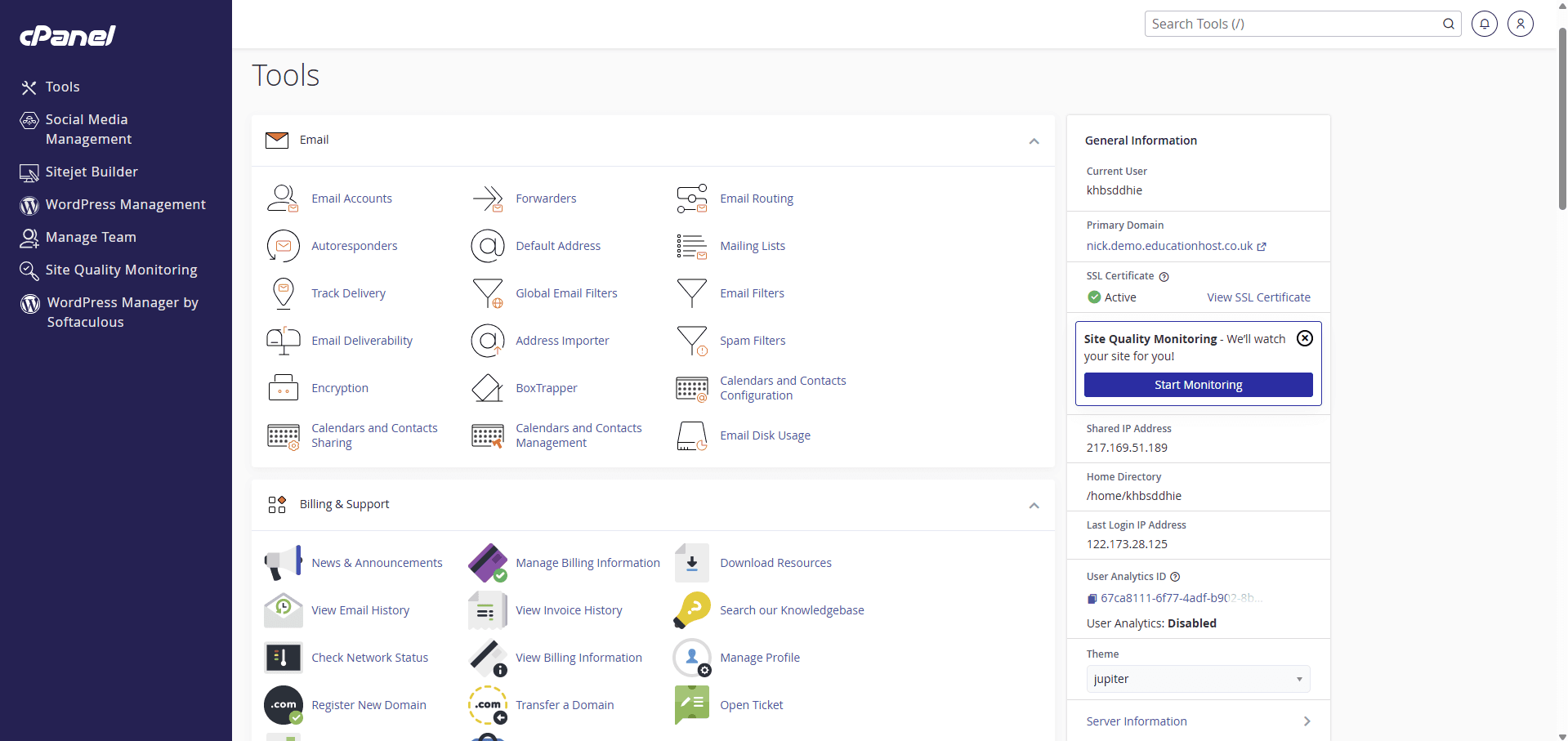
Every screenshot below is the actual platform — the management dashboard IT and academic teams use, and the dashboard and cPanel tools students see.
What is Student Web Host Manager?
Student Web Host Manager is an education-focused platform for managing student web hosting at scale. It gives institutions a structured way to provision, manage, suspend and archive student hosting accounts across courses, modules, teaching blocks and campuses, while students access their hosting through Microsoft Entra sign-in and cPanel.
It is real cPanel hosting behind an education-specific management layer. Students get a dashboard with their web hosting, group projects and Cloud Pulse services where enabled; institutions get governance, delegation and lifecycle automation aligned to the academic calendar.
Designed and developed by Education Host, Student Web Host Manager turns student web hosting from a manual IT burden into a governed academic service.
Student hosting should not be managed through spreadsheets and manual account work
Give a whole cohort hosting by hand and the admin never stops. Student Web Host Manager replaces per-account effort with policy-driven control.
Thousands of accounts, constant churn
Students join, change modules and leave every term. Manually creating, resetting and removing hosting accounts across courses and campuses consumes IT time all year round.
Unmanaged access and passwords
Standalone hosting accounts mean separate passwords, unclear ownership and no central visibility — exactly what institutional security policies are trying to eliminate.
No clean end to a module
Without lifecycle controls, old accounts stay active long after teaching ends. Suspension at module end, marking windows and archival all become manual clean-up jobs.
Microsoft Entra sign-in and policy-aligned access
Student Web Host Manager works with Microsoft Entra (formerly Azure Active Directory), so students and staff sign in with their existing university credentials rather than another set of passwords. Access is role-based and follows your institutional structures — SWHM complements institutional identity governance, it does not replace it.
- Students and staff use existing university credentials
- No separate, unmanaged hosting passwords
- Role-based access — lecturers and administrators see only what they need
- Access aligned to courses, modules and teaching blocks
- Conditional access where institutionally configured
- Dashboard visibility for administrators and staff
Provision, suspend and archive accounts around the academic calendar
Hosting accounts follow the academic year, not the other way round. Accounts are created around modules and cohorts, suspended when teaching or marking requires it, and archived in line with institutional policy — without a term's worth of manual account work.
- Bulk user import and enrolment-workflow sync
- Module dates and teaching blocks drive access
- Suspension manager for module end and marking windows
- Lifecycle states — active, restricted, archived, reopened
- Bulk user actions and user removal
- Policy-aligned clean-up with audit visibility
Built around how universities organise teaching
Generic hosting treats every account the same. Student Web Host Manager models your academic structures — locations and campuses, courses, modules, teaching blocks and cohorts — so hosting access always maps to how teaching is actually organised, including multi-campus and distance-learning provision.
- Locations and campuses
- Courses and modules
- Teaching blocks grouped by academic period
- Cohorts of students with lecturer and administrator access
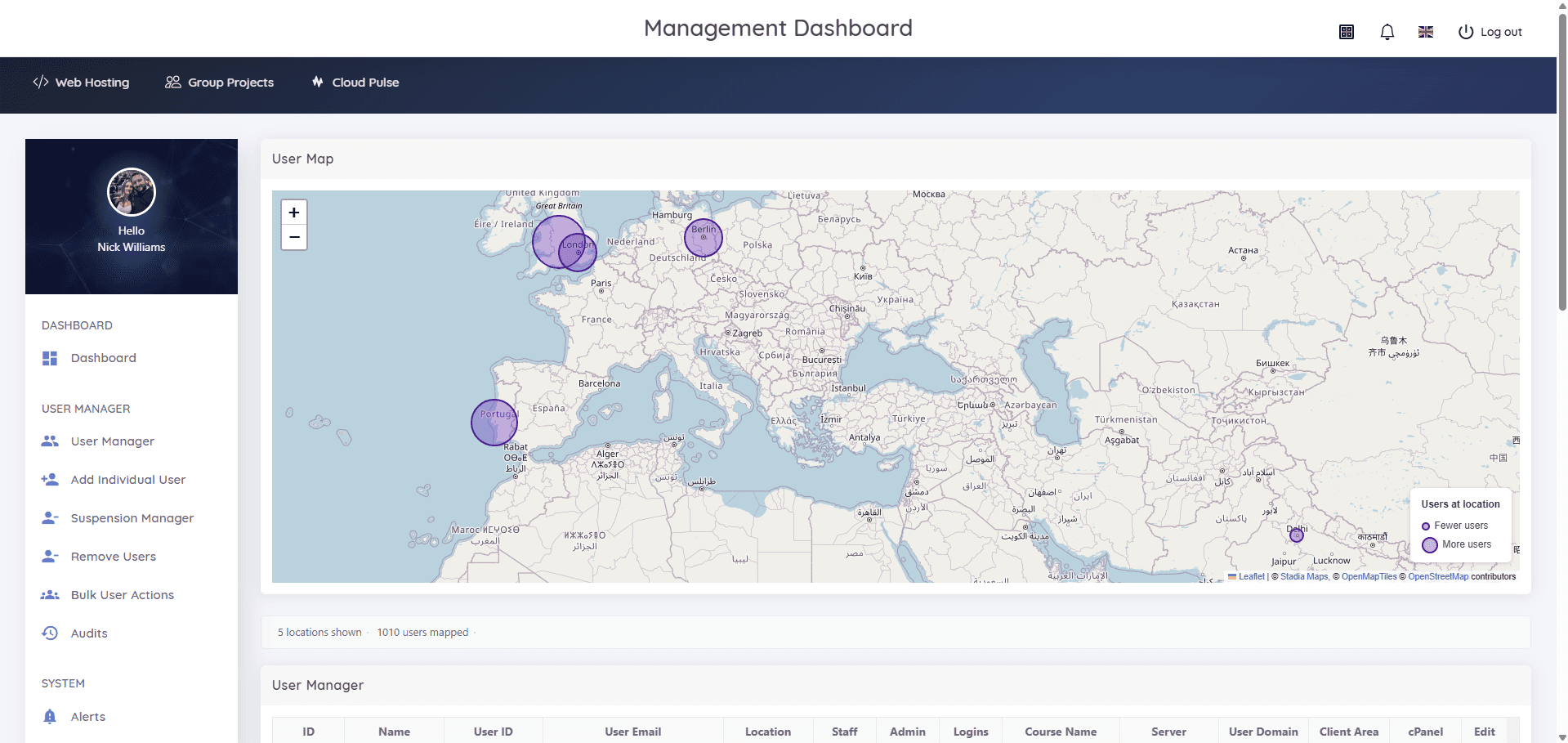
- User Map — see where users access the platform worldwide
- Works for campus-based, multi-site and distance cohorts
A web hosting account for each student, without the manual setup
Each student receives their own hosting environment — on a domain or subdomain model depending on institutional setup — and a dashboard that brings their services together: web hosting, group projects and Cloud Pulse services where enabled, plus knowledgebase search and support in the same place.
- Personal student dashboard with service status at a glance
- One-click access to hosting and cPanel login
- Group project hosting alongside individual accounts
- Cloud Pulse services surfaced in the same dashboard where enabled
- Knowledgebase search and support tickets built in
- PHP, MySQL and WordPress-ready hosting for practical modules
Real cPanel hosting, inside a governed workflow
Students work in cPanel — the same industry-standard hosting control panel they will meet after graduation — with email, files, databases, WordPress tooling and site-building available for practical work. The institution keeps the governance layer over the top, so there is no unmanaged student hosting sprawl.
- Familiar, industry-standard cPanel tools
- Email accounts, forwarders and routing where relevant
- Files, databases and web development tooling
- WordPress management and site builder
- Domains and institution-branded subdomains
- Institutional oversight over every account
Give lecturers visibility without giving away infrastructure control
Lecturers and administrators manage the students, courses and modules relevant to them — from the User Manager, not from the hosting infrastructure. IT keeps control of servers and policy; academic staff get the day-to-day visibility that would otherwise arrive as support tickets.
- Delegated, role-based management for lecturers and administrators
- Searchable User Manager across students, courses, servers and domains
- Client-area and cPanel links for each student in one table
- Suspension manager, bulk actions and user removal
- Alerts and audit visibility
- Fewer routine requests landing on the IT service desk
Understand usage, risk and engagement
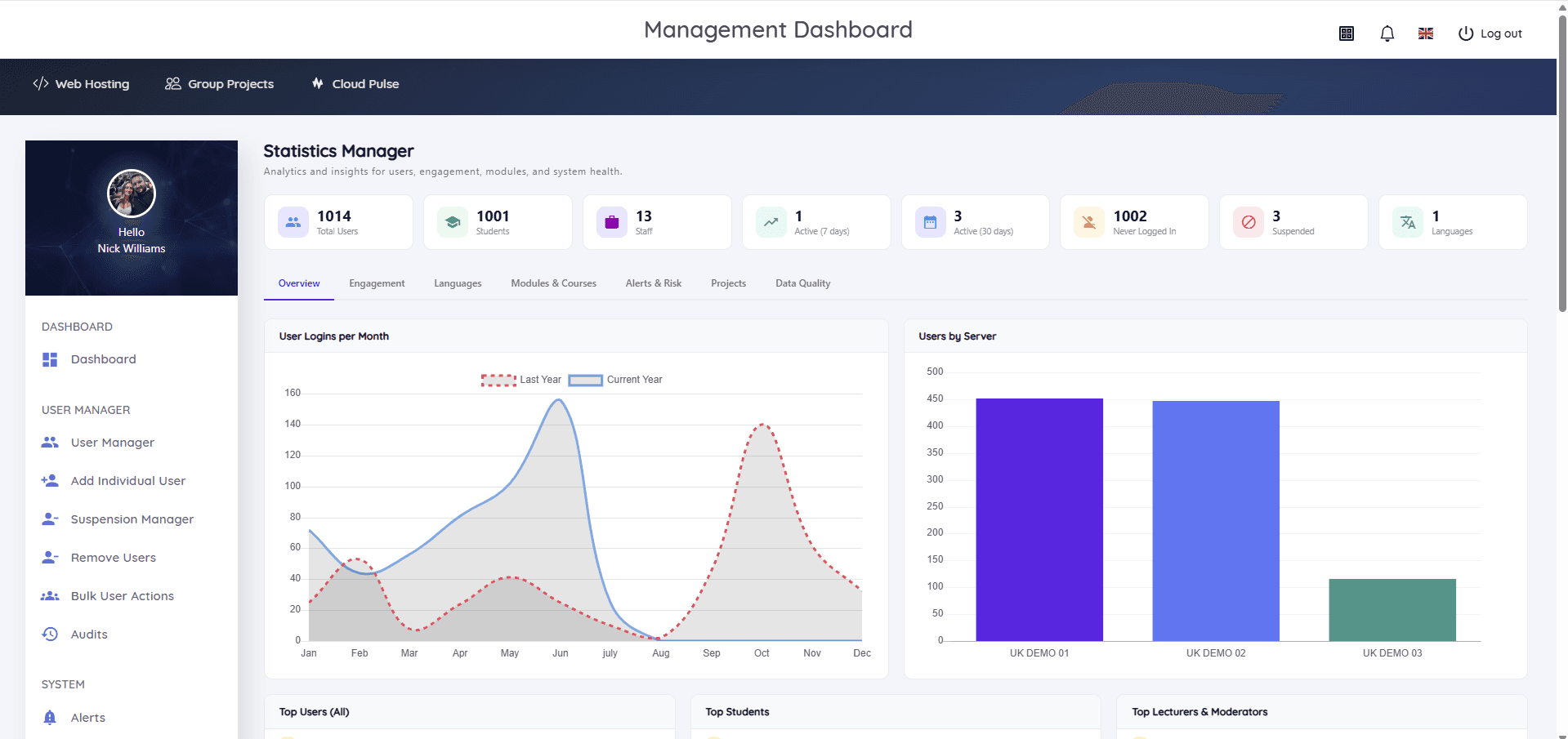
The Statistics Manager gives administrators an operational view of the whole hosting estate — who is active, who has never logged in, what is suspended and how usage is distributed across servers — so decisions about capacity, engagement and clean-up are based on data rather than guesswork.
- User logins and engagement trends over time
- Active students and staff over 7 and 30 days
- Never-logged-in accounts highlighted
- Suspended accounts tracked
- Users by server distribution
- Engagement, modules, alerts-and-risk and data-quality views
Hosting for the modules universities actually teach
Student Web Host Manager supports practical teaching wherever students need real hosting.
Web development courses
HTML, CSS, PHP and MySQL work on real hosting — every student publishes to their own environment from week one.
WordPress teaching
WordPress tooling in cPanel for CMS, digital publishing and client-project modules, without students self-hosting.
Digital business & marketing
Live sites for digital business, marketing and e-commerce modules where students need a real web presence.
Creative & digital media
Portfolio and media project hosting for creative courses, on institution-branded student domains or subdomains.
Full-stack, APIs & databases
Databases, server-side code and backend coursework in the same governed environment as front-end work.
Group projects & distributed cohorts
Shared group project hosting alongside individual accounts — including multi-campus and distance-learning cohorts.
From enrolment to archival in six steps
Student Web Host Manager follows the academic lifecycle from setup to clean-up.
- 1
Configure academic structures
The institution sets up courses, modules, teaching blocks and locations to mirror how teaching is organised.
- 2
Import or sync students
Students are added individually, by bulk upload or via enrolment workflows, and assigned to their courses.
- 3
Provision hosting accounts
Hosting environments are created automatically with standardised, institution-branded configurations.
- 4
Students sign in with Entra
Students use their existing university credentials — no separate hosting passwords to issue or reset.
- 5
Students work in their dashboard
Each student opens their dashboard and cPanel hosting tools in a browser — hosting, group projects and Cloud Pulse services where enabled.
- 6
Monitor, suspend and archive
Lecturers and administrators monitor activity, and accounts are suspended and archived in line with module dates and institutional policy.
Platform capabilities
Everything institutions need to run student web hosting as a governed service.
Microsoft Entra SSO
Institutional sign-in for students and staff.
cPanel hosting access
Industry-standard hosting tools for every student.
Student dashboard
Hosting, group projects, Cloud Pulse where enabled and support in one place.
Course & module management
Hosting access aligned to courses and modules.
Teaching blocks
Group modules by academic period and calendar.
User Manager
Search and manage every student, course, server and domain.
Statistics Manager
Engagement, activity and server distribution reporting.
User Map
Location visibility across campuses and countries.
Suspension manager & bulk actions
Suspend, reopen, remove and act on accounts in bulk.
Role-based access
Delegated permissions for lecturers, administrators and IT.
Alerts & audits
Operational alerts and audit visibility across the estate.
Managed by Education Host
Backups, infrastructure and support handled for you.
Student Web Host Manager and Cloud Pulse work together
Student Web Host Manager handles governed student web hosting; Cloud Pulse handles browser-based computing labs and virtual teaching environments. Together they help institutions deliver practical computing teaching without unmanaged infrastructure overhead — and where enabled, students see their Cloud Pulse services in the same Student Web Host Manager dashboard.
Education Host supports institutions including
Education Host supports universities and colleges across student hosting, education cloud platforms and managed services — including institutions such as Arden University, Canterbury Christ Church University and Atlantic Technological University.



Institutions shown are Education Host customers across our wider platform and service portfolio.
Student Web Host Manager — frequently asked questions
Answers to common questions about Student Web Host Manager, Education Host's governed student web hosting platform for universities and colleges.
- What is Student Web Host Manager?
- Student Web Host Manager is a governed student web hosting and provisioning platform for universities and colleges. It provisions, manages, suspends and archives student hosting accounts across courses, modules, teaching blocks and campuses, with Microsoft Entra sign-in and cPanel access for students.
- Who is Student Web Host Manager for?
- Student Web Host Manager is for universities and colleges — IT teams, academic schools and faculties, digital learning teams, and lecturers teaching web development, WordPress, digital business, computing and software modules.
- Does Student Web Host Manager include cPanel?
- Yes. Students access real cPanel hosting — email, files, databases, WordPress tooling and site building — behind Student Web Host Manager's education-specific management layer.
- Does Student Web Host Manager support Microsoft Entra / Azure AD sign-in?
- Yes. Student Web Host Manager works with Microsoft Entra (formerly Azure Active Directory), so students and staff sign in with their existing university credentials, with role-based access and conditional access where institutionally configured.
- Can Student Web Host Manager provision accounts for entire cohorts?
- Yes. Students can be imported individually, by bulk upload or via enrolment workflows, and hosting accounts are provisioned automatically with standardised, institution-branded configurations.
- Can Student Web Host Manager manage modules and teaching blocks?
- Yes. Hosting access is organised around courses, modules and teaching blocks, so access follows the academic calendar and how teaching is actually structured.
- Can accounts be suspended at the end of a module?
- Yes. The suspension manager and lifecycle controls suspend, reopen and archive accounts around module dates, marking windows and institutional policy — without manual per-account work.
- Can lecturers manage their own students?
- Yes. Role-based access lets lecturers and administrators manage the students, courses and modules relevant to them, while IT retains control of servers and policy.
- Does Student Web Host Manager include analytics and reporting?
- Yes. The Statistics Manager reports on logins and engagement trends, active students and staff, never-logged-in accounts, suspended users and users by server, with engagement, alerts-and-risk and data-quality views.
- Can students access group projects and Cloud Pulse from the dashboard?
- Yes. The student dashboard brings together web hosting, group project hosting and — where an institution enables it — Cloud Pulse services, alongside knowledgebase search and support.
- Is Student Web Host Manager suitable for WordPress teaching?
- Yes. Students get WordPress tooling within cPanel, making it well suited to CMS, digital publishing, digital business and client-project modules.
- How is Student Web Host Manager different from standard web hosting?
- Standard hosting gives you accounts. Student Web Host Manager adds the education management layer: Microsoft Entra sign-in, course, module and teaching block structure, delegated lecturer access, lifecycle and suspension controls, reporting and institutional visibility.
- Can Student Web Host Manager work alongside Cloud Pulse?
- Yes. Student Web Host Manager covers governed student web hosting while Cloud Pulse provides browser-based computing labs, and students can see their Cloud Pulse services in the same dashboard where enabled.
- Is Student Web Host Manager cloud-hosted?
- Yes. Student Web Host Manager is a cloud-hosted platform delivered and supported by Education Host on managed UK data-centre infrastructure.
- How do we book a demo?
- Book a Student Web Host Manager demo directly using the booking links on this page, and we'll walk through the management dashboard, student experience and lifecycle controls with your institution's student numbers and requirements in mind. Pricing is confirmed after a demo and scoping conversation.
See Student Web Host Manager in action
Book a demo to see how Student Web Host Manager helps universities provision student hosting, manage modules and teaching blocks, support cPanel access, monitor engagement and reduce manual account administration. Talk to us about your institution's student numbers and requirements.