
Use case — IT, Admin & Security
Reduce student hosting workload for IT teams
Student hosting should not be a standing item on the IT team's backlog. Education Host provides the hosting, runs the infrastructure and — through Student Web Host Manager — replaces manual account creation, password resets and end-of-term clean-up with governed, calendar-aligned automation.
- Bulk provisioning instead of per-account creation
- Microsoft Entra sign-in — fewer hosting password resets
- Suspension and archival aligned to module dates
- Delegated lecturer access reduces routine tickets
- Education Host manages the platform and infrastructure underneath
A use case supported by Education Host — platforms, hosting and infrastructure built exclusively for education.
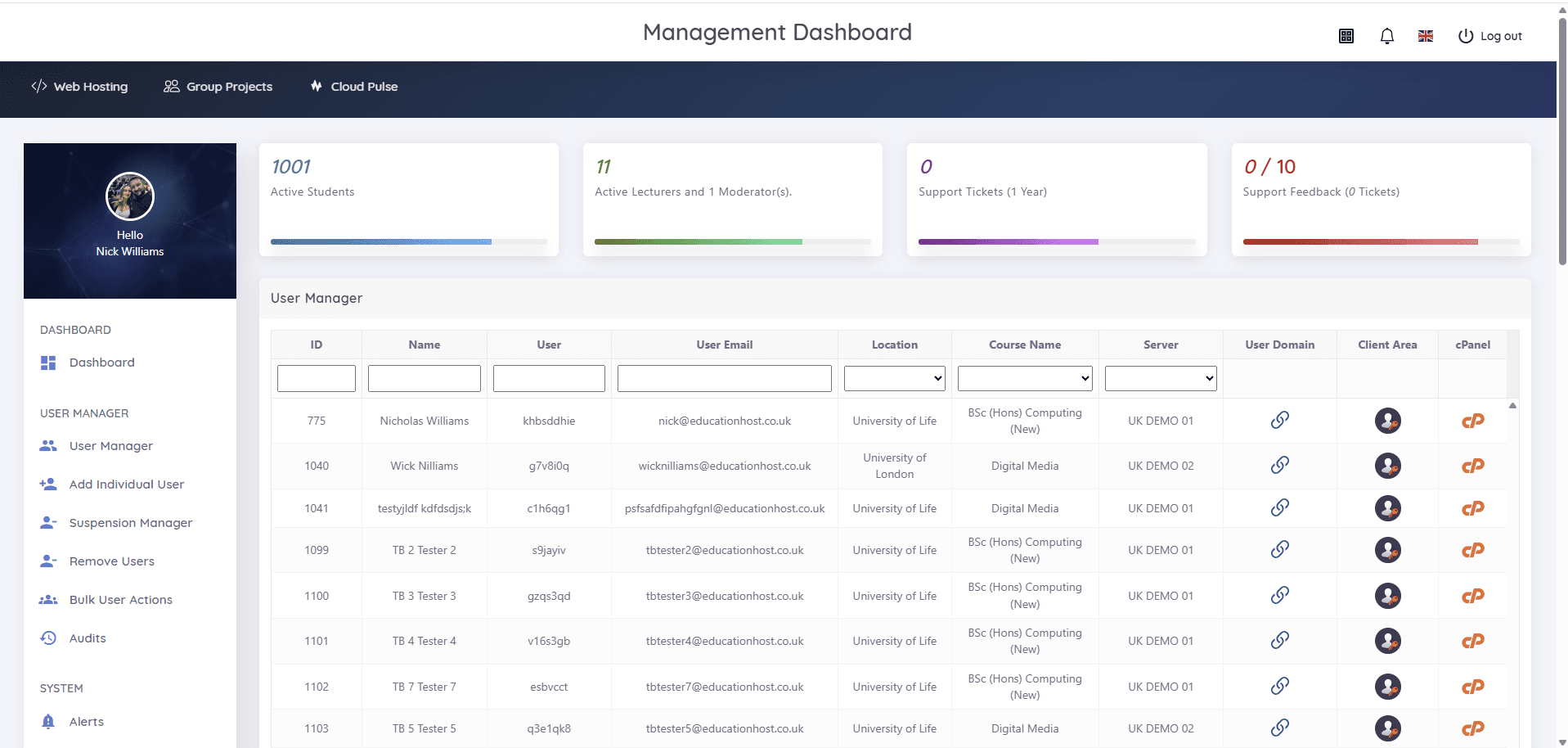
The operational challenge: hosting admin that never ends
Give a cohort hosting by hand and the work recurs every term — creation, resets, questions, clean-up — while the security picture quietly worsens.
Account churn all year round
Students join, switch modules and leave continuously. Manual account work scales with headcount and never finishes.
Password resets and orphaned access
Separate hosting passwords mean reset tickets in term time and unmanaged credentials after students leave.
IT sits between lecturers and hosting
Routine questions — who has an account, which site is whose, can this student be reopened — all land on the service desk.
How Education Host reduces the hosting workload
Education Host takes student hosting off the IT team's plate at two levels. Student Web Host Manager automates the account layer: students are imported in bulk or synced via enrolment workflows, hosting is provisioned with standardised configurations, and accounts are suspended and archived around module dates and marking windows.
Because students sign in with Microsoft Entra, there are no separate hosting passwords to reset, and role-based access lets lecturers manage their own students from the User Manager instead of raising tickets. Underneath it all, Education Host runs the hosting platform and UK infrastructure — with managed technical support available where teams want a standing escalation route.
- Bulk import and enrolment-workflow sync for whole cohorts
- Automatic provisioning with standardised, institution-branded configurations
- Microsoft Entra sign-in — existing credentials, conditional access where configured
- Suspension manager and lifecycle states for clean module ends
- Delegated, role-based access for lecturers and administrators
- Statistics Manager for engagement, suspended accounts and server distribution
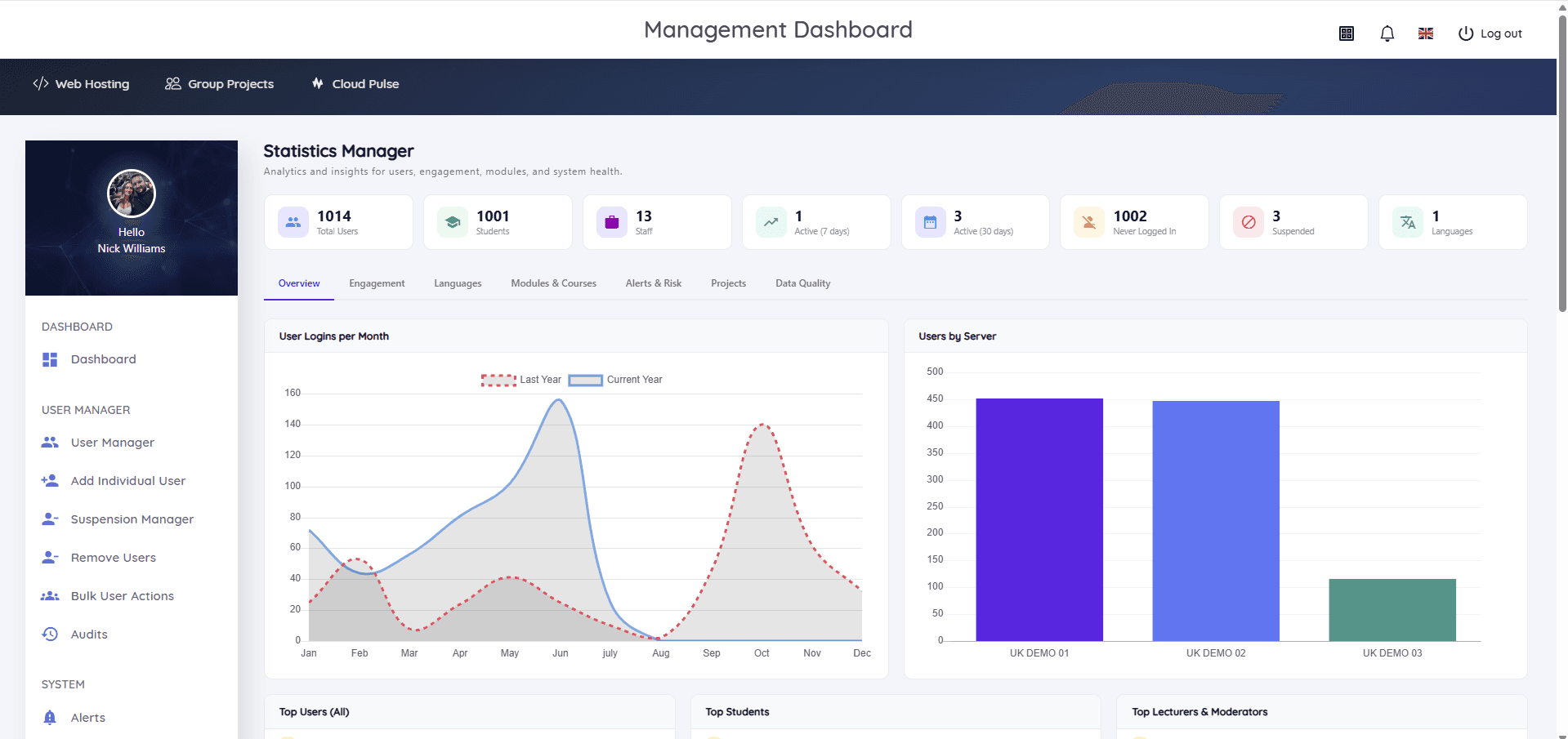
What IT teams get back
Visibility up, ticket volume and manual work down.
- Provision a cohort's hosting without per-account work
- Retire hosting password resets from the ticket queue
- See every account, course, server and domain in one searchable view
- Let lecturers handle day-to-day student queries themselves
- Close out modules with bulk suspension instead of manual clean-up
- Escalate platform issues to Education Host rather than owning them alone
Example operational workflows
What the term looks like with the platform in place.
Term start
Enrolment data drives bulk provisioning; students sign in with Entra on day one — no account-creation sprint.
Mid-term oversight
The Statistics Manager flags never-logged-in and suspended accounts, so engagement problems surface early.
Assessment window
Accounts are restricted around deadlines and marking windows through the suspension manager — no ad-hoc requests.
Term end
Bulk lifecycle actions archive the cohort in line with policy, with audit visibility of what changed.
Which Education Host platforms fit this use case
Workload reduction comes from the governance platform plus the managed service around it.
Student Web Host Manager
Governed student web hosting at institutional scale
The automation layer — provisioning, Entra sign-in, delegation, lifecycle controls and estate-wide reporting.
Explore Student Web Host ManagerEducation Web Hosting
Managed web hosting built for education
The managed hosting service itself, supported by an education-only UK team.
Explore Education Web HostingManaged Infrastructure
UK data-centre hosting, managed by Education Host
Monitored UK data-centre infrastructure — capacity, resilience and platform operations handled by Education Host.
Explore Managed InfrastructureManaged Technical Support
Support for education platforms and infrastructure
A scoped support arrangement where IT teams want a standing escalation route alongside their own capacity.
Explore Managed Technical SupportOperational outcomes
- Manual hosting account work stops scaling with student numbers
- Hosting password resets largely disappear from the service desk
- Lecturers self-serve the visibility they used to request as tickets
- Module ends are clean, auditable lifecycle events
- IT retains policy control while Education Host runs the platform
Explore related use cases
Scenarios institutions often pair with this one.
Assessment & marking periods
Freeze student hosting at the deadline, keep work available to markers and reopen cleanly — deadline control without manual account work.
Explore use caseWeb development courses
Give every student on a web development module real hosting — HTML, CSS, JavaScript and PHP on live URLs, provisioned and governed centrally.
Explore use caseGroup project hosting
Shared, governed spaces for team coursework — group sites and environments with clear membership, lecturer visibility and deadline controls.
Explore use caseSoftaculous & one-click apps
WordPress and hundreds of other applications installed in one click where enabled — CMS teaching and app experimentation without setup time.
Explore use caseReduce hosting workload for IT teams — frequently asked questions
Direct answers about this use case and the Education Host platforms behind it.
- How does Education Host reduce hosting workload for IT teams?
- Student Web Host Manager automates provisioning, sign-in and lifecycle management around the academic calendar, while Education Host runs the hosting platform and infrastructure — so IT teams keep policy control without doing per-account work.
- Does this remove hosting password resets?
- Largely, yes. Students sign in with Microsoft Entra using their existing university credentials, so there are no separate hosting passwords for IT to reset.
- Can lecturers manage their own students?
- Yes. Role-based, delegated access lets lecturers and administrators manage the students, courses and modules relevant to them, while IT retains control of servers and policy.
- What visibility do IT teams keep?
- A searchable User Manager across students, courses, servers and domains, plus the Statistics Manager for engagement trends, never-logged-in accounts, suspensions and server distribution — with alerts and audit visibility.
- Does Education Host replace our internal IT team?
- No. Education Host runs the hosting platform and infrastructure and can provide scoped managed technical support alongside internal teams — as extra capacity and an escalation route, not a replacement.
- Which Education Host platform delivers this?
- Student Web Host Manager on Education Web Hosting, running on Education Host managed infrastructure — with managed technical support available where a standing support arrangement helps.
- How do we start?
- Book a consultation with Education Host — we'll map your current student hosting workload, student numbers and identity setup, and show where the manual work goes.
See how this use case fits your institution
Tell us about your modules, cohorts and calendar, and we'll map this use case to the right Education Host platforms — including what to leave out.